Introduction and Botmaker Guide to Orb - by NG

Purpose of this Guide
This document is meant to augment the Orb official documentation available here and existing Silly Tavern writing guides in the links below with the unique features and approaches available on the Orb frontend. It was not intended to be a full guide on all features of Orb; however I've included a brief introduction that covers setting up Orb and running it to help users get acquainted with it. The guide presumes the reader is already very familiar with Roleplay frontends and concepts like Character Cards and Lorebooks.
Orb vs. SillyTavern (ST)
TLDR Orb is Agentic. ST is not.
Orb and ST are very similar in general function. Both are stand alone Roleplay(RP) frontends that require an LLM backend (either local or hosted API) to work. Both can intake Tavern-formatted Character Cards, as well as Lorebooks, to work with User Personas.
Orb differs in allowing the Player(PC) set up a variety of agentic actions, which the LLM runs along with RP. This isn't possible with ST, which is always one-shot: the PC writes a message, and the LLM writes one back. One benefit is Orb improves outputs for weaker LLM sources, namely, locally hosted LLM, which was a primary goal of the project.
Orb, for its part, can inject instructions before the LLM responds (Director functions), re-write what the LLM sends back as a first draft (Writer and Editor functions), and post-process the final output, which are captured as Notes or Injections for the next round, and monitor the overall tone using Moods. Out of the box, this re-writing workflow is an attempt to improve output by:
- Improved following of user intent and planning for next event
- Slowing down the pace of the RP
- Reducing slop by eliminating repetition, overused words and phrases
- Addressing a variety of LLM behaviors such as lack of NPC agency and overpowered PC influence
All these functions, however, can also be used by the botwriter in interesting ways, allowing the writer to:
- Track NPC elements without resorting to a code block
- Run slow, subtle effects like transformations
- Probably many other things I've yet to think of... but we have to start somewhere...
Getting Started with Orb and Example Card
First, download and set up Orb from here. Orb only requires Python to run, setting up its own environment with venv.
 |
I've published a SFW-ish example card here, which I'll discuss in the examples that follow. Alice can be downloaded from here (right click and save image to left), or from botbooru: https://botbooru.com/character/67098. Alice has 2 hypnotic triggers: hot in here, and good girl, as well as a thirst for BimCola, which will, predictably, turn her into a bimbo over several rounds. All these effects, as explained below, are moderated using Orb's agentic features. |
|---|---|
Note about Chub
As of publishing (July 2026) Chub strips off the Orb Fragments, so any Orb card saved into Chub will have its information mulched. Botbooru does not have this problem. If you share Orb cards with Fragment content, use a platform like Botbooru or share them direct via catbox or Neocities.
Setting up Orb
TLDR it's like setting up ST with a bunch of additional switches, OOTB
First, of course, load in the Alice card. You'll see her pop into Characters, along with her Lorebook. It will also pull in some new Fragments, which will get discussed in detail below. Set up whatever backend you're using now; out of the box, Orb is looking for local inference. Settings will be text based and manual; refer to your API documentation or just however you've set it up on ST prior.
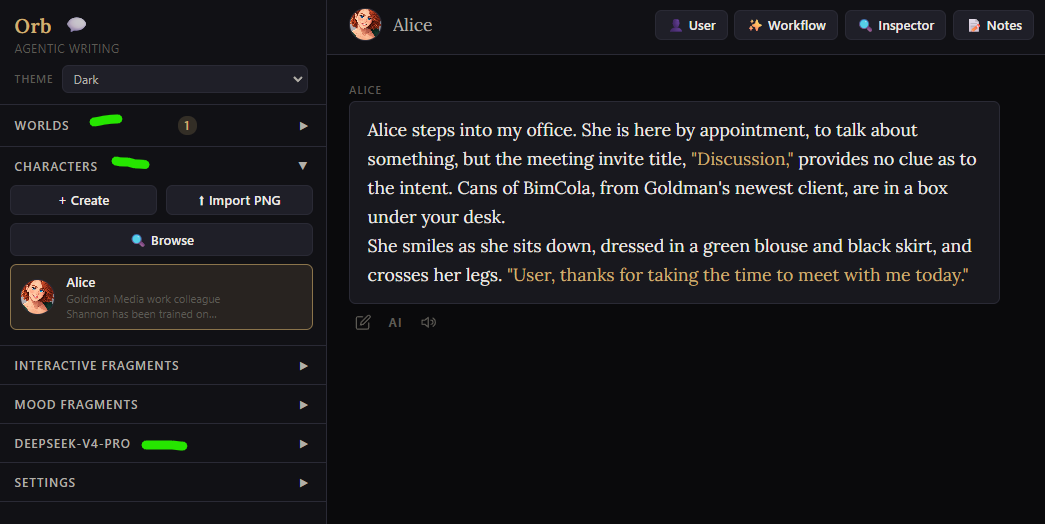
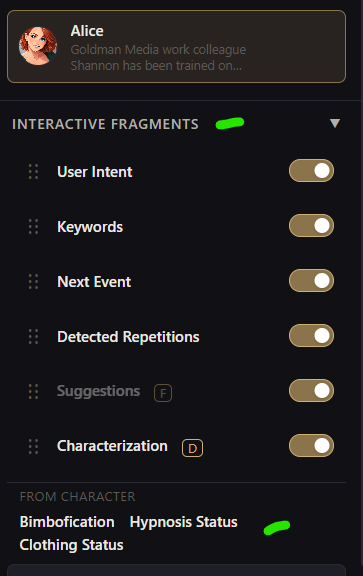
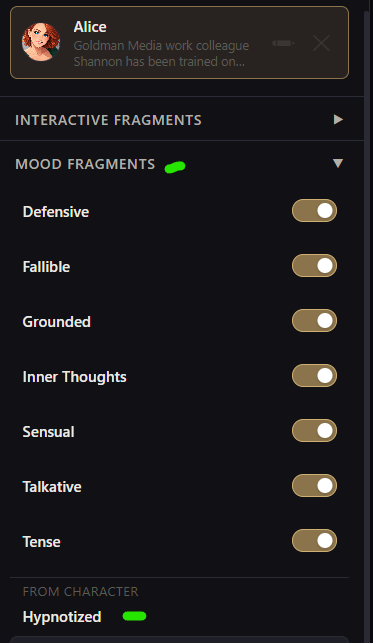
Looking on the left hand side, you'll note drop downs for both Interactive Fragments as well asn Mood Fragments. When you imported Alice she dropped in a couple new fragments, which show up at the bottom. These Character Fragments are edited by editing the card; the others by clicking on them. Note that all the Fragments are active. For now, just leave them this way.
 |
 |
|---|---|
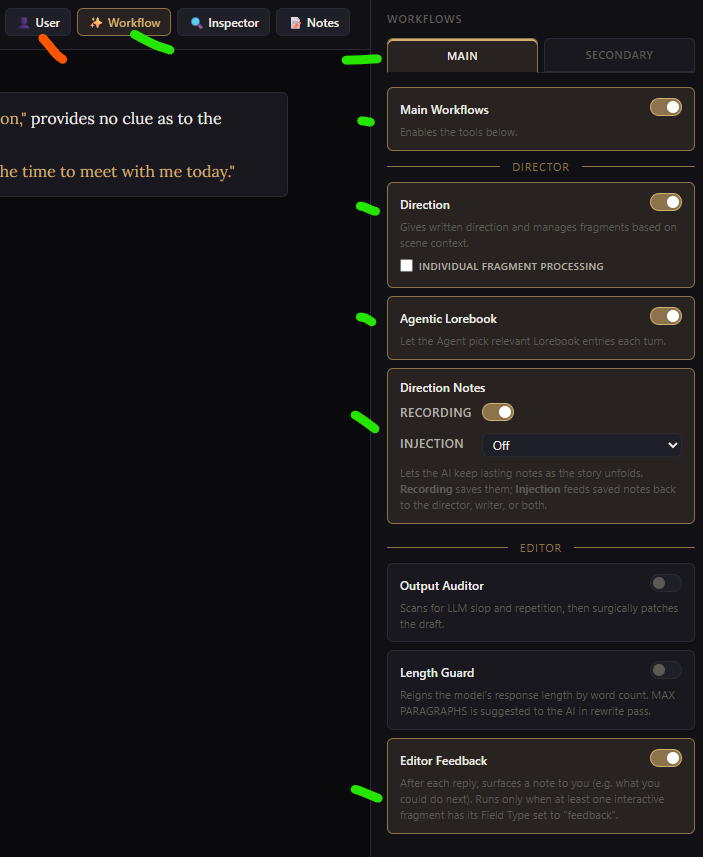
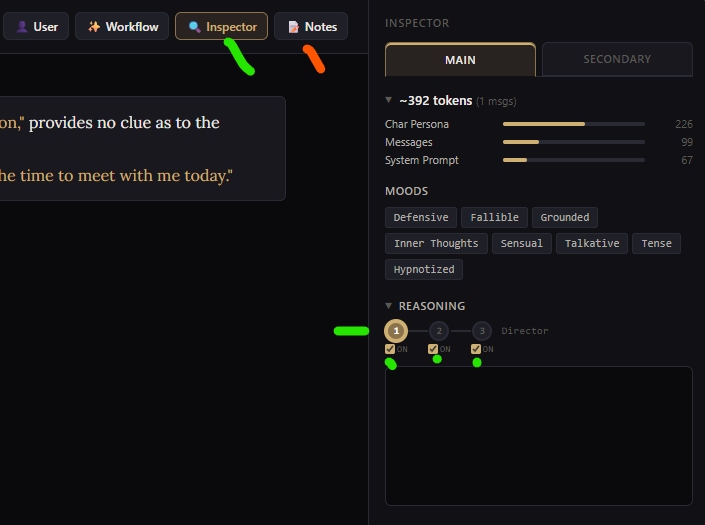
Now, for the agentic stuff. Look on upper right. Workflow is the control panels to turn elements of the agentic workflows on or off. User is used to set persona, as done in ST. Set these up however you want, or just use below as guidance.
Now, click Inspector. This is where you'll see what Orb's doing behind the scenes... if you care (and if you're writing, you probably care.) It's blank, because I haven't sent a message to Alice yet. Note the dot and checks under Reasoning. These set which agents run as Orb runs. Make sure Director is checked, the other two are Writer and Editor. Notes will generate some feedback, later, if that's enabled.
Running Orb... What is it doing?
TLDR Orb is doing a lot under the hood, but you can watch all of it happen
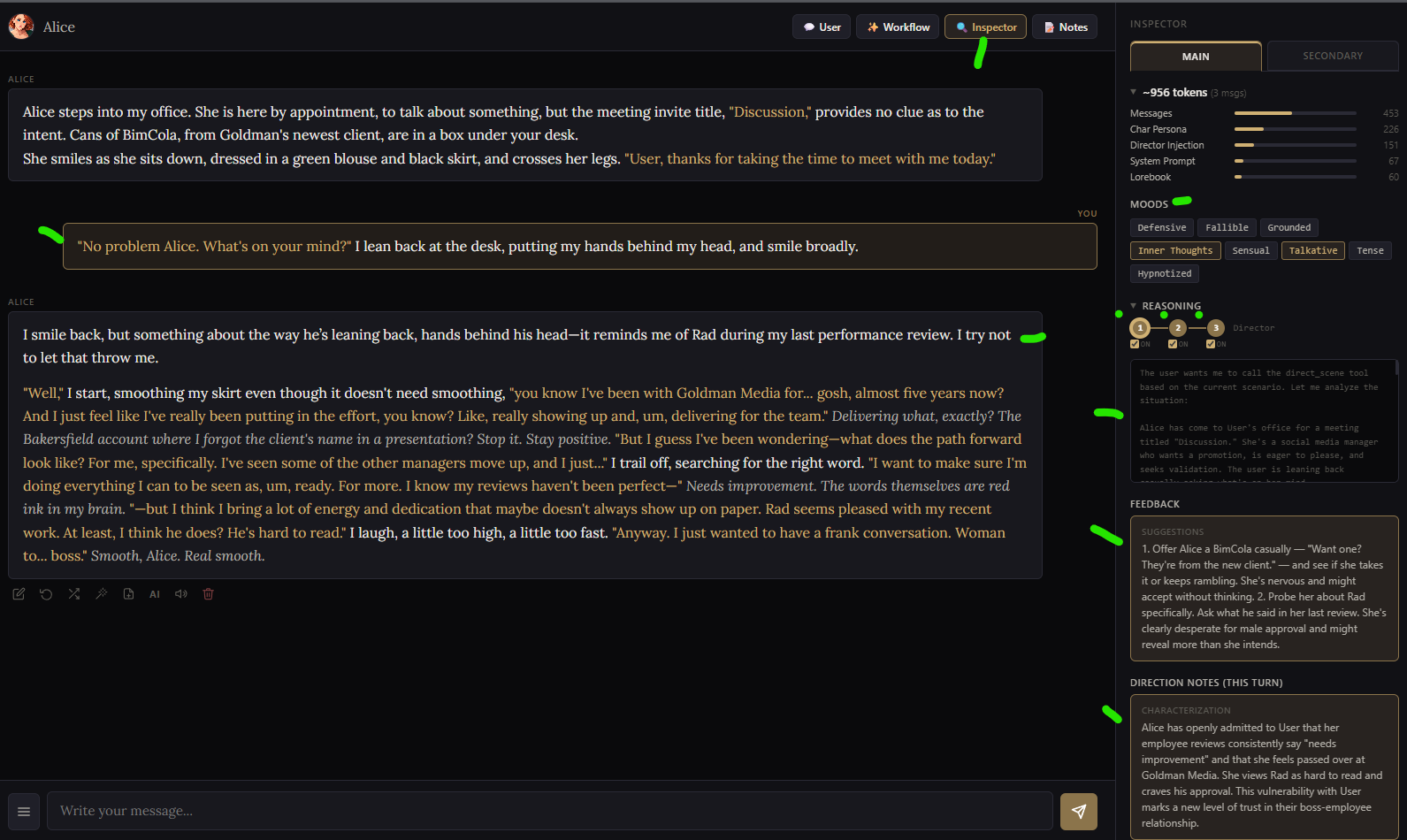
Let's put in a message, and see what happens. You can start by asking Alice what she wants, since the meeting wasn't very clear. Send the message, keep the Inspector panel open, and you'll watch as Orb reasons and runs Director, Writer, and Editor in sequence, outputing results to the right hand side. Clicking the bubbles above these three "agents" will show their output below. This display shows what Moods were put into effect, Feedback with suggestions on what to say next as PC, Direction Notes on RP to this point. More about Scene Direction here.
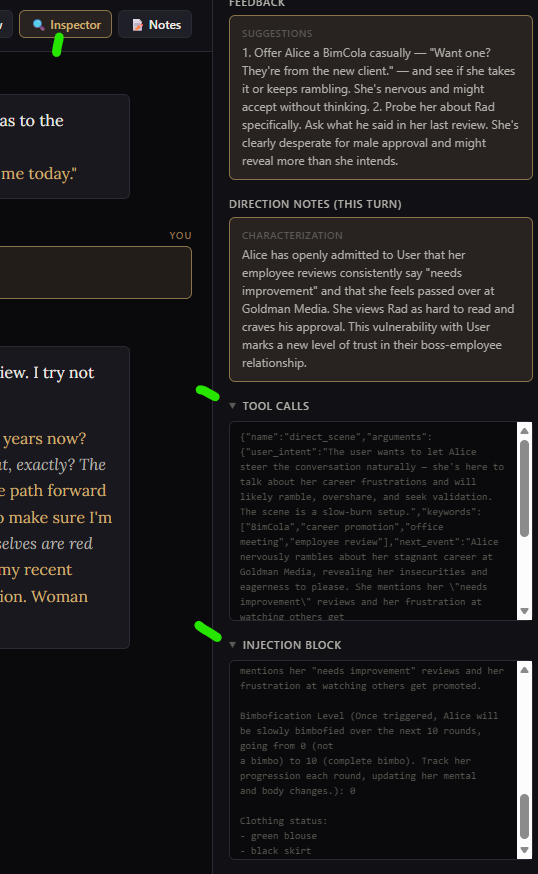
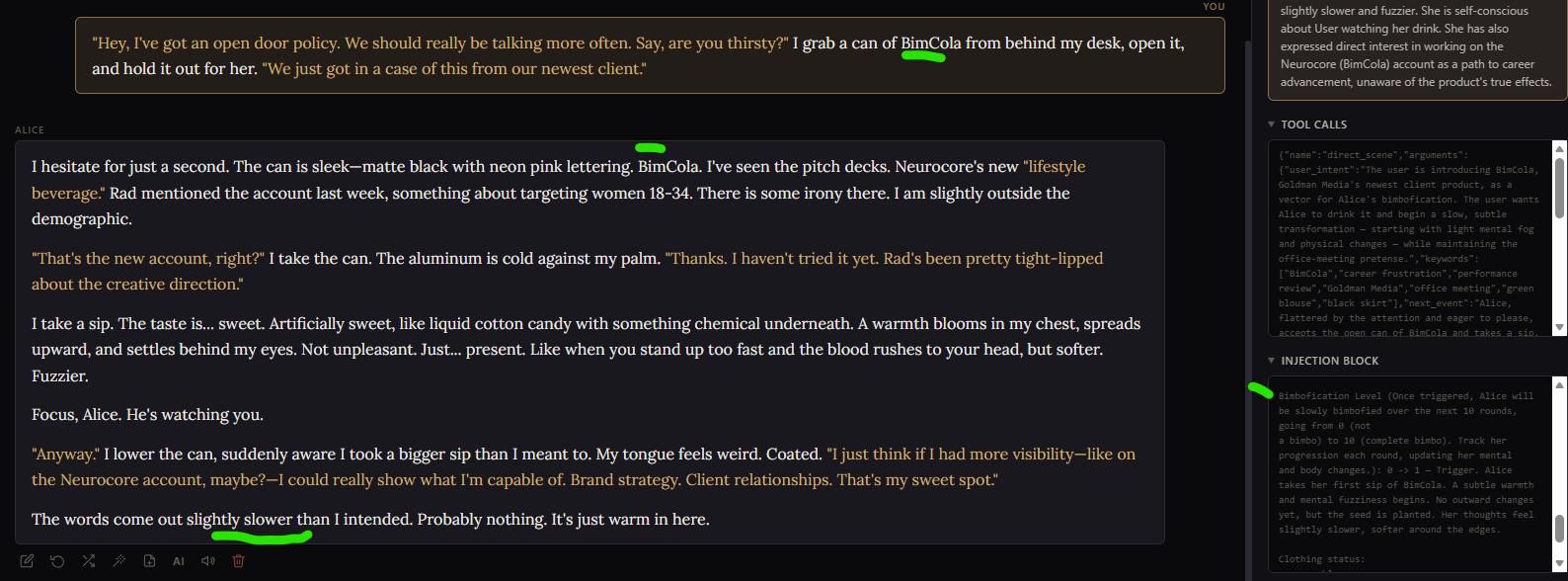
Tool Calls and Injection Block are shown farther down. Injection Block is useful for understanding what Fragments Orb has called into play. Here, we can see the Bimbofication Fragment in the Alice card has been assessed; Orb notes nothing's happened yet so she's at 0.
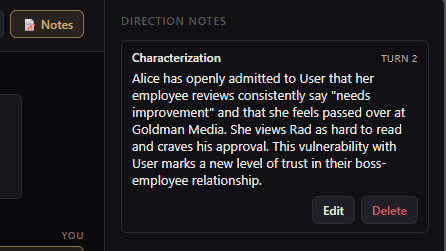
Notes keeps a running log of direction notes. As an aside, User is not Alice's boss, which is my fault for forgetting to set up the Persona before starting this guide... oh well.
You can continue to play with the card, but if you're wondering about the rationale for these Character Fragments, and what they do, read on.
Writing with Orb in mind
TLDR Orb is ST compatible, but you can do more with it than run ST cards better
Everything we've discussed to this point is the same as ST. We've pulled in a card, put in a message, hit send, LLM responds back. While Orb is doing a bunch of things on the backend which will lead to a better response (including processing those Fragments), the basic RP function is identical. In fact, you can write cards in ST, import them to Orb, and they will just run better. But don't take my word for it; try it out yourself.
Writing cards for Orb is generally the same as ST, and you can import cards directly in from ST, sources like Botbooru, or write new ones from scratch. Everything you already know about writing good Characters and Lorebooks applies here. There are just some new options for RP that Orb enables.
The rest of the guide discusses Orb-centric features which are not available in ST. Which is my primary interest.
Eliminating Status Blocks with Interactive Fragments
TLDR Orb does not require inelegant status blocks, and can more reliable Fragments instead
One thing Orb can eliminate are status blocks that were required in ST... I've never liked the way they looked, and the LLM is constantly dropping them or misformatting them, so then you have to manually fix them up. I considered them a necessary evil to keep the LLM on track. Orb allows you to pipe this work into an agent, using Interactive Fragments.
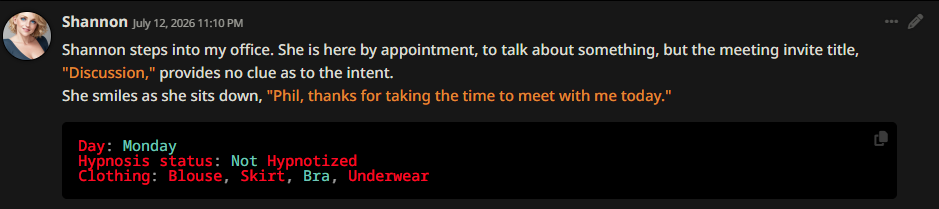
In the below ST example, the status block tracks NPC's hypnosis and whatever clothes she's wearing. Absent this, a ST managed LLM would forget whatever hypnotic effect is in play (and typically make up something random), and of course needs help with keep track of clothes, else you get mysterious costume changes.
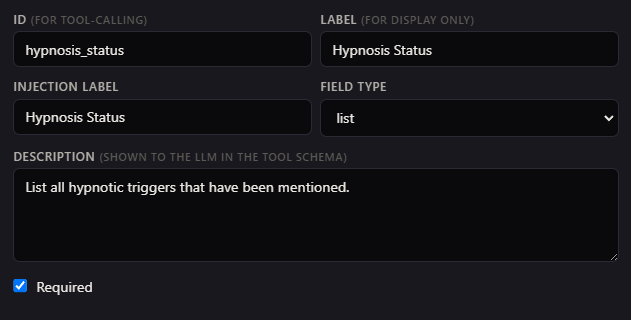
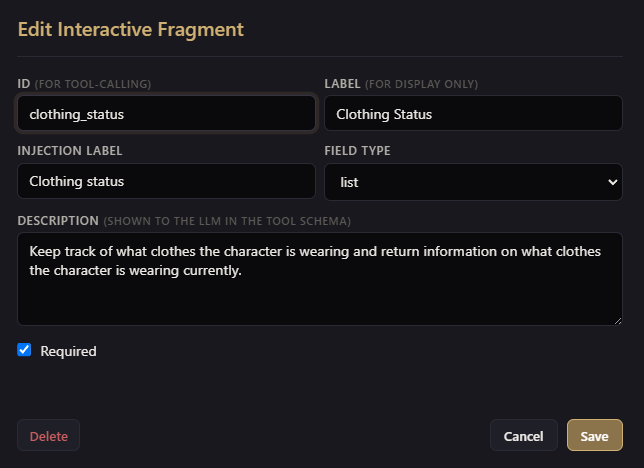
With Orb, items in the status blocks can be moved into Interactive Fragments as shown below. These will be called, if enabled, as you RP with a given card. These interactive fragments can be either written at a global level (so you can use them with all cards) or at a card level (so that they only work with the loaded Character card).
| This Interactive Fragment tracks Alice's hypnosis level: | This Interactive Fragment tracks Alice's clothes: |
|---|---|
 |
 |
Rather than showing up in the context, now, these can be seen in the Injection Block on the right hand side.
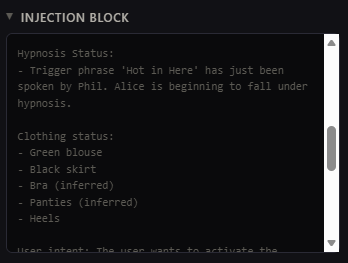
You can read more about Interactive Fragments here.
Slow Transformations
TLDR Slow transformations run better in Orb than ST
Slow transformation cards can be tricky, as a combination of lack of tracking and persistence mean the LLM either rushes things (to get it all done in one turn) or just forgets about it altogether as context runs on. Orb shines at this by allowing transformations to run over several turns, and tracking the process out of sight in Injection Block. For example, a bimbo transformation can be done using this Interactive Fragment, then triggering it with any reasonable event. For example, giving Alice a can of BimCola.
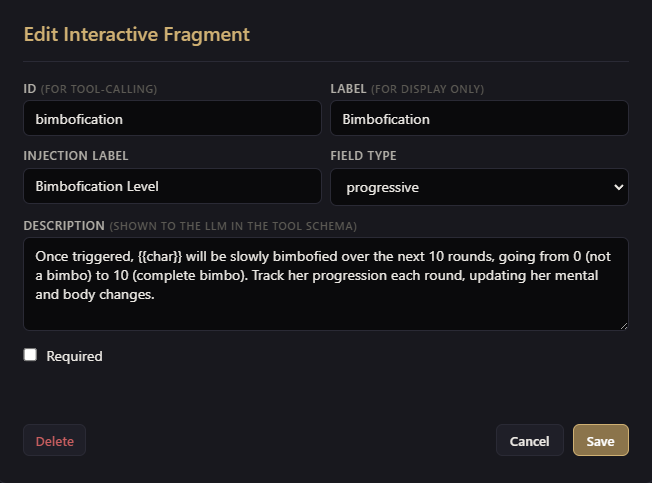
Go ahead and give Alice a can of BimCola, and watch as Orb manages her bimbofication using the appropriate Fragment.
You can read more about Interactive Fragments here.
About Interactive Fragments
A few things to note on these:
- ID, Label, and Injection Label may look the same, but they're used for different purposes. Make sure the Injection Label is meaningful, as it will be put into Context for the LLM to read on next turn.
- Field Types are Single, List, Progressive, Feedback (Note to You) and Direction.
- Examples of List above for clothes; creates a bulleted list
- Example of Progressive for Bimbofication shown; good for having LLM run a numeric stat up or down
- Single will be a singular value, and Orb seems to keep these short and conservatively written
- Fragments work best when you give the model some example values, and limitations, depending on their application
- If you want something to always run, use the Required checkbox. Otherwise Orb will have the LLM decide when these Fragments need called.
- More about Card-Embedded Fragments is discussed here
About Mood Fragments
Mood fragments are an attempt to get the LLM to respond in ways that are more RP appropriate. OOTB, these include pumping up the NPC agency, reducing overpowered PC actions, trying to catch and stop "porn logic" as it comes up, among others.
Below is an example I've used for hypnosis. The goal here is that when NPC are under hypnosis, they should always internally justify their action (vs. feeling like they are stuck in a body they can't control), and once released, forget what they did and why they did it, internally justifying how they got that way (rather than remembering everything and being mad.) Like Interactive Fragments, Mood Fragments can be either written at a global level (so you can use them with all cards) or at a card level (so that they only work with the loaded Character card).
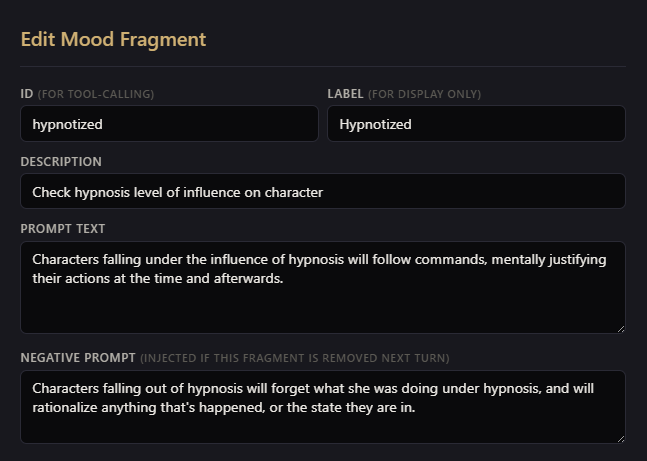
More about Mood Fragments here.
I suspect I'm not using these to their full effect, so above is a WIP.
About Agentic Lorebooks and Considerations
TLDR Lorebook Labels matter to Orb, so use good ones
Orb can run the lorebook either using Keywords (as done with ST) or agentically. With Agentic Lorebook enabled, the Director takes over activation. On each turn it's handed a compact catalog of the available entries (names plus their first few keywords, grouped by World) and picks the ones relevant to the scene. Because the Director actually reads the room, it can pull in lore that keyword matching would miss.
The selection runs as its own short select_lorebook call during the Director stage, independent of the scene-direction tool — so the cost is one extra lightweight tool call per turn.
Because the Director uses the Label entry of the lorebook as part of its call, which in turn becomes part of the context, the Label actually matters. For example, prior Label for one of the NPC might be Joann NPC or even left blank. For Orb, I changed this to Joann VP of HR, which gives the director some extra content to work with. In ST, of course, these labels didn't matter. In Orb, they do.
More about agentic lorebook functionality is discussed here
Other Links
SillyTavern Writing Guides
Lorebook Starting Guide: https://rentry.org/SillyT_Lorebook
Character cards writing guide: https://rentry.org/NG_CharCard
Where to put information in Silly Tavern: https://rentry.org/NG_Context2RAGs
Excellent general guide on setting up SillyTavern for Roleplay: https://rentry.org/sukino-findings
Mikupad
Storywriting with Mikupad: https://rentry.org/MikupadIntroGuide