Rentry added ads, L RENTRY; Use Brave Browser to block them. Or install ublockOrigin on Firefox!
MotivationPageWhenTempted
✨Guide to block all the pornography once and for all✨
> Pick your operating system: Windows 🔐💯🔥 || Android 🔐💯🔥 || Linux 🔐🔥 || IOS 🔥 || MAC🔐🔥 || Bonus: Routine🛡️
but why would you want to block all pornography if you want to quit all pornography? EasyPeasy says that you don't have to do it.
◄ Matthew 5:30 ► : And if your right hand causes you to stumble, cut it off and throw it away. It is better for you to lose one part of your body than for your whole body to go into hell. - Hand obviously means reach. The point is to remove temptation sites for your need. So you can block more than the ones blocked with this method, for example if telegram drags you down, uninstall it; If youtube is a temptation, block it entirely aside some whitelisted channels, and use alternatives like odysee or soundcloud.
If an alcoholic in recovery were to sleep with his bottle, it would be non-sense, but that's what people who seek to stop using pornography do. Obviously the addictive drive would take over. You can't quit crack cocaine while having infinite and free crack cocaine all around you. That's what pornography is, literally, as proven by real science. Mere suppression doesn't work,
A radical change is needed. Change your overall routine and your Self Identity ~ I am free ~ and feel this way, then you block all the pron ,and you become free and enjoy your life again!!

。・::・゚★。・::・゚☆。・::・゚★。・::・゚☆
Search engines like ~ Ecosia, brave, duckduckgo, Mojeek ~ suck , as they link pron. Instead, Use:
🌲Search for Trees | Kiddle search engine | Safe Search google | Bing
🌟Bonus: Download IceBreathing for your PC; no horny - webapp + BREATHLY , an app for daily pranayama.
Invidious Youtube | 2 | 3 | nitter instance
soundcloud frontends | 2 | 3
DeepL frontends | 2 | 3 | 4 | 5
You can use https://reddit.nerdvpn.de/r/nofap | https://safereddit.com/r/semenretention | https://redlib.r4fo.com for reddit. they are SFW only. https://libredirect.github.io/ / 2 use this and configure it for only these instances aforementioned.
Pick a cool theme like Gruvboxdark, subscribe to some subreddits and enjoy your feed as a lurker.
there's also Nuvio for watching movies and series, on all platforms, for free.
Make a list with things to do when temptation hits, then you would lock the devices and flee from lust; tasks such as:
- a cold shower - > a long walk - > 20m pranayama - > workout - > prayer - > meditation - > 70 burpees - > pranayama again.
。・::・゚★。・::・゚☆。・::・゚★。・::・゚☆
The Synergy of this Block Explained:
Windows Config
[🔐 - the block can be locked]
1. Install Cold Turkey ~
It still DOES work even without pro.
On windows, since this app isn't available on linux, you can use a debloated version like ReviOS/Tiny11/LTSC/AtlasOS etc. if you please so.Win activatator that offers extended updates (ESU) for free.
Download My Config | [mirror] and import it. By clicking on the 3 lines , aka hamburger button, in the top right, and then Import.
Take a look at the blocks and comprehend what keywords are blocked.
The block Keywords blocks most keywords that can be used to access pron;
AFTER you implement the rest of the settings, lock Cold Turkey -> Keywords & Browser for ~ a month.
IMPORTANT: In Cold Turkey, go to settings, then 'Block strictness' , last option -> seconds given to re-enable.. give it only ~7 seconds; and also check-mark ✔ 'Block Windows time settings' and ✔ 'Block unsupported browsers when a block is active and contains websites.' under BYPASS PROTECTION .
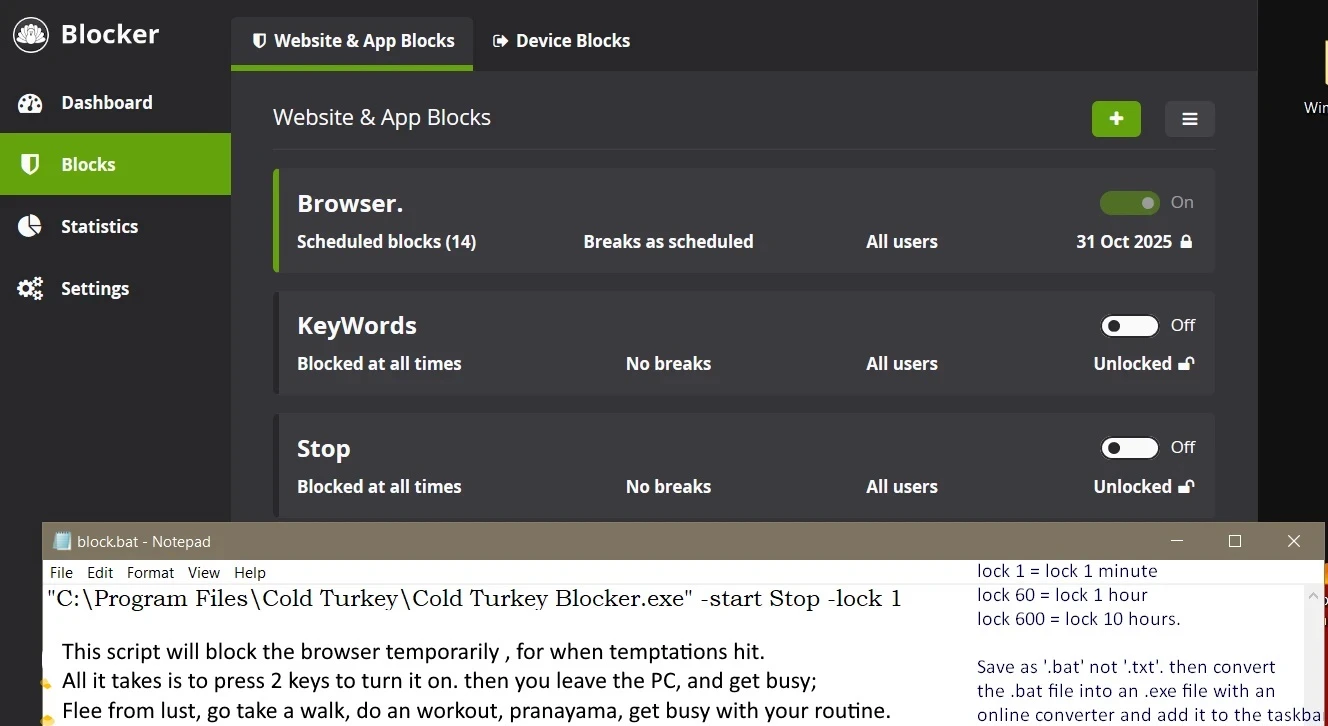
2. Configure the blocks:
Brave Browser is needed in order for this OPTIONAL step to work. Download it from Brave.com , NOT from Microsoft Store.
💠Make a .bat file with this text , by copying it in a notepad (save as- > Save as type - > ~ all files ~ and name it like Blocker.bat, NOT as .txt and Save).
Make the bat file with this text⬆ | this will block your browser [BRAVE] for 5 hours (300 minutes) ; During this time, you won't have access to it when you activate it with winkey+1. You can change that to another number, 600 would be 10 hours, etc etc;.
then use an app to convert the bat file to an .exe file, such as 'Bat_To_Exe_Converter_x64.exe' with an icon like this.
You'd have to drag the .bat file over the interface, click icon to add the icon, and then click 'Convert' to export.
Add the .exe file to the taskbar by dragging it there, in the first place, and use winkey+1 (since it's first) to turn it on. It will block the Browser - use it when you have a temptation and leave the PC and do something else.
stop is to block the browser temporarily when encountering strong temptations and keywords is the main block to block all pronography.
This script will trigger the block stop when used;
Install the Cold Turkey extension properly, and configure it by allowing access to incognito tabs (open brave, right click on the cold turkey extension, click 'manage extension' and give it all the permissions needed) ; AFTERWARDS, disable incognito, tor mode and guest profile, with the following commands: run them in cmd with admin, you can paste the entire block at once:
The optional block Browser blocks brave (it should be your only browser) during night-time, from 22:00 -> 06:00 every day.
But you can play games, watch offline content, read downloaded books.. or even access certain websites though nativefier.
You can turn websites like these into an app with it.
Plus you can install a PS2/PS3/PS4/nintendo emulator and play console games on your PC.
Lock Browser and Keywords for like ~ a months by using the 🔒 button at each block, AFTER you finish with the rest of the steps.
3. Download my hosts file | [mirror] and put it in C:\Windows\System32\drivers\etc.
Open it in notepad and comprehend that the sites and domains listed there will be blocked, you're free to remove some, or add your own. Up to you.
Go to the hosts file, right click on it, select 'Properties' and configure it like this:
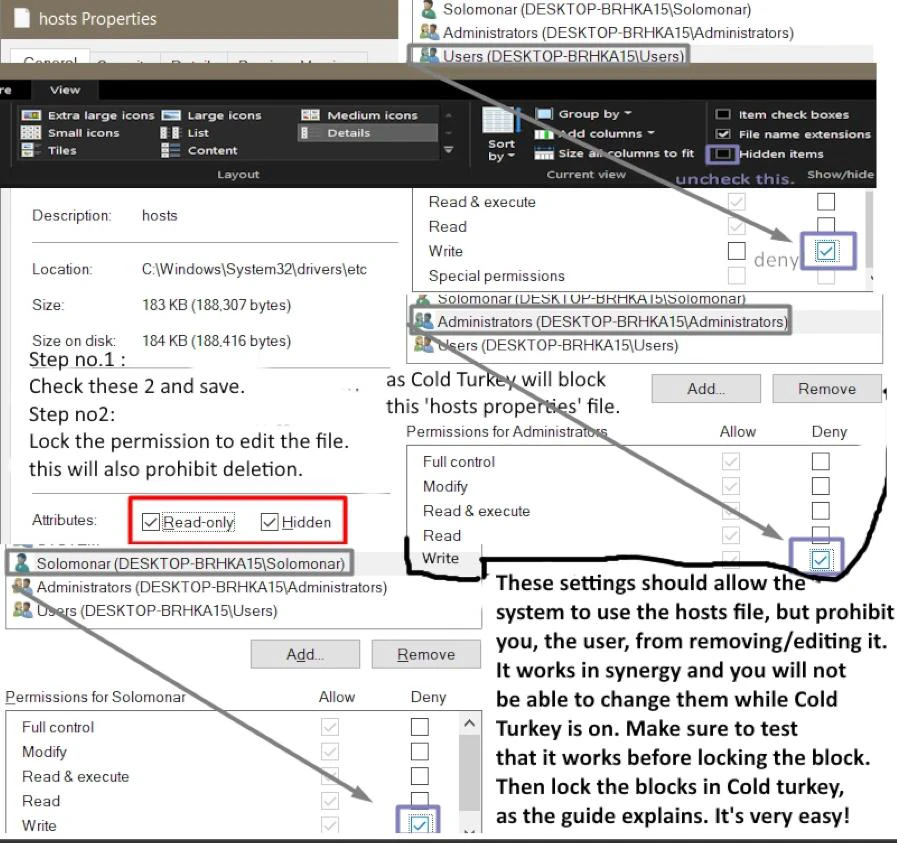
Cold turkey will block the 'Host properties' tab and you will not be able to change these settings, hence you won't be able to edit or delete the hosts file, given that you configured it like this. Make sure to not deny permission to the system from reading it; Only the admin/user should have denied permissions, usually the last 3 profiles at the bottom.
If you use qBittorrent, go to appdata ->Local->qBittorrent [%LocalAppData% in run] and delete 'nova3', this will only disable the search plugins. You can use this, also save your own magnets if need be.
4. Download THIS software to Change your DNS.
checkmark ✔️APPLICATION UNINSTALL PROTECTION, and also ✔️enable HARDENING from Settings.
and then select 'Free adult filter', then go to settings again & add a random password , no need to save it, since there's no need to undo this. If you anyhow found an xxx site that isn't blocked, please send them an email and let them know to block it at: support@cleanbrowsing.org
AND
Go to brave://settings/shields/filters and click on 'Show Full list' and check ✅ ' Pron Blocker - blocklist anti-pron', then click 'Update list', and save.
Safe Mode PATCH.
You can also prevent the access to safe mode , so in this way it will be impossible to uninstall cold turkey. Use both methods.
Warning: If you've blocked Safe Mode, full Windows reinstall is the only way to remove Cold Turkey. This is irreversible. Don't attempt to bypass via SafeMode, you CAN NOT and your PC will GET STUCK IN A BOOTLOADER!!!!!!! . THIS IS TESTED BY ME, DO NOT PLAY AROUND!!!⚠️
Forget about Safe Mode. Use your PC normally. If you want to make changes in ColdTurkey, just wait for the block time to pass.
Method #1
Open command prompt in admin , type this:
reg delete HKLM\SYSTEM\CurrentControlSet\Control\SafeBoot /f
Or
Open PowerShell in admin , type this:
Remove-Item -Path "HKLM:\SYSTEM\CurrentControlSet\Control\SafeBoot" -Recurse -Force
AND
Method #2
Open command prompt in admin , type these lines; you can paste all of them at once.
-> Once you configured the Hosts file , the DNS and safe mode, then open Cold Turkey and Lock the block by clicking on lock 🔒 on each block, lock them [ Keywords & Browser are the main blocks] , for like 30 days. after the first month, if you got used to it, you can increase it to more months.
OPTIONAL - but if you can, then apply it:
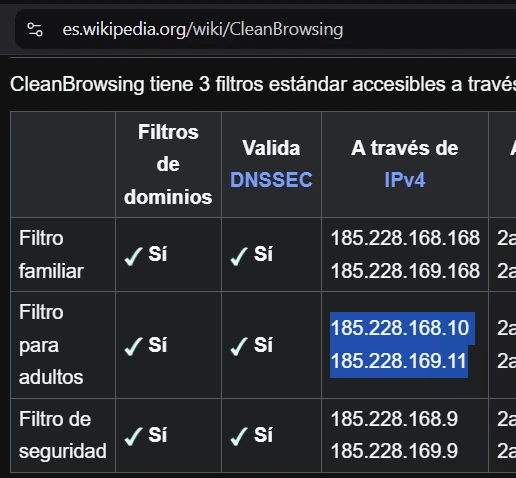
At the router level you can also change the DNS, given that your ISP allows it, so
DNS1: 185.228.168.10
DNS2: 185.228.169.11
OPTIONAL HARDENING FEATURES BELOW, THEY ARE NOT PART OF THE CORE BLOCK:
Bonus: You can also disable Regedit and CMD with the following commands:
To un-do, you would have to install another registry app to remove the keys manually. You can't do this when you turn on the Lock (in Cold Turkey).
OPTIONAL #2:
reg add HKCR\SystemFileAssociations\.inf\shell\Install /v LegacyDisable /f - to block the ability to install .inf files.
reg delete HKCR\SystemFileAssociations\.inf\shell\Install /f - to disable the ability to install .inf files by right click - install.
reg add "HKLM\SOFTWARE\Microsoft\Windows\CurrentVersion\Policies\Explorer" /v SettingsPageVisibility /t REG_SZ /d "hide:network-proxy;network-vpn" /f - to disable the VPN and proxy menu from settings.
reg delete "HKCR\batfile\shell\open" /f - to block the ability to run .bat files.
reg delete "HKCR\batfile\shell\runas" /f - to block the ability to run .bat files.
I don't really recommend to disable them, unless need be, to patch things.
OPTIONAL #3 : reset the DNS with these commands if things get stuck.
OPTIONAL #4: The ultimate patch to make the block immutable by all means;
If, you somehow found a way to bypass [ABSOLUTELY IMPOSSIBLE SINCE ALL BYPASSING METHODS, ALL UNINSTALLERS AND CLI CONSOLES ARE LOCKED] , then, make a standard account for you and add a password to the admin account; Give it to a friend or send it to your future self via [future mail].
without admin privileges, the windows architecture prohibits uninstalls, because you'd lack permissions.
But there is NO** need for this, unless you're a super advanced coder and can code your own CLI console from scratch or something.
OPTIONAL #5: configure the firewall, so that it blocks all the other DNSes and ports, except the CleanBrowsing DNS and its ports.
Save this script as firewall.ps1 on Desktop. By pasting it in a notepad file, with the .ps1 extension. Name it firewall.ps1 .
1 2 3 4 5 6 7 8 9 10 11 12 13 14 15 16 17 18 19 20 21 22 23 24 25 26 27 28 29 30 31 32 33 34 35 36 37 38 39 40 41 42 43 44 45 46 47 48 49 50 51 52 53 54 55 56 57 58 59 60 61 62 63 64 65 66 67 68 69 70 71 72 73 74 75 76 77 78 79 80 81 82 83 84 85 86 87 88 89 90 91 92 93 94 95 96 97 98 99 100 101 102 103 104 105 106 107 108 109 110 111 112 113 114 115 116 117 118 119 120 121 122 123 124 125 126 127 128 129 130 131 132 133 134 135 136 137 138 139 140 141 142 143 144 145 146 147 148 | $ErrorActionPreference = "Continue"
Write-Host "Applying restricted outbound firewall policy..." -ForegroundColor Cyan
# -------------------------
# ENABLE FIREWALL (idempotent)
# -------------------------
Set-NetFirewallProfile -Profile Domain,Private,Public -Enabled True
# Helper function: only create rule if it doesn't exist
function Ensure-FirewallRule {
param (
[string]$DisplayName,
[hashtable]$Params
)
$exists = Get-NetFirewallRule -DisplayName $DisplayName -ErrorAction SilentlyContinue
if (-not $exists) {
New-NetFirewallRule -DisplayName $DisplayName @Params | Out-Null
Write-Host "[CREATED] $DisplayName" -ForegroundColor Green
}
else {
Write-Host "[SKIP] $DisplayName already exists" -ForegroundColor DarkGray
}
}
# -------------------------
# ALLOW HTTPS / HTTP
# -------------------------
Ensure-FirewallRule "ALLOW-HTTPS-OUT" @{
Direction = "Outbound"
Protocol = "TCP"
RemotePort = 443
Action = "Allow"
}
Ensure-FirewallRule "ALLOW-HTTP-OUT" @{
Direction = "Outbound"
Protocol = "TCP"
RemotePort = 80
Action = "Allow"
}
# -------------------------
# ALLOW EMAIL PORTS
# -------------------------
$emailPorts = @(25, 465, 587, 110, 995, 143, 993)
foreach ($p in $emailPorts) {
Ensure-FirewallRule "ALLOW-EMAIL-$p" @{
Direction = "Outbound"
Protocol = "TCP"
RemotePort = $p
Action = "Allow"
}
}
# -------------------------
# ALLOW CLEANBROWSING DNS
# -------------------------
$cbRange = "185.228.168.0/23"
Ensure-FirewallRule "ALLOW-CB-DNS-UDP53" @{
Direction = "Outbound"
Protocol = "UDP"
RemotePort = 53
RemoteAddress = $cbRange
Action = "Allow"
}
Ensure-FirewallRule "ALLOW-CB-DNS-TCP53" @{
Direction = "Outbound"
Protocol = "TCP"
RemotePort = 53
RemoteAddress = $cbRange
Action = "Allow"
}
Ensure-FirewallRule "ALLOW-CB-DoT-853" @{
Direction = "Outbound"
Protocol = "TCP"
RemotePort = 853
RemoteAddress = $cbRange
Action = "Allow"
}
# -------------------------
# BLOCK RAW DNS BYPASS
# -------------------------
Ensure-FirewallRule "BLOCK-EXTERNAL-DNS-UDP53" @{
Direction = "Outbound"
Protocol = "UDP"
RemotePort = 53
Action = "Block"
}
Ensure-FirewallRule "BLOCK-EXTERNAL-DNS-TCP53" @{
Direction = "Outbound"
Protocol = "TCP"
RemotePort = 53
Action = "Block"
}
# -------------------------
# ALLOW BRAVE BROWSER
# -------------------------
$bravePath = "$env:ProgramFiles\BraveSoftware\Brave-Browser\Application\brave.exe"
if (Test-Path $bravePath) {
Ensure-FirewallRule "ALLOW-BRAVE-APP" @{
Direction = "Outbound"
Program = $bravePath
Action = "Allow"
}
Write-Host "[OK] Brave allowed" -ForegroundColor Green
}
# -------------------------
# BLOCK VPN / PROXY PORTS
# -------------------------
$blocked = @(1194, 500, 4500, 1723, 51820, 1080, 3128, 8118)
foreach ($p in $blocked) {
Ensure-FirewallRule "BLOCK-VPN-UDP-$p" @{
Direction = "Outbound"
Protocol = "UDP"
RemotePort = $p
Action = "Block"
}
Ensure-FirewallRule "BLOCK-VPN-TCP-$p" @{
Direction = "Outbound"
Protocol = "TCP"
RemotePort = $p
Action = "Block"
}
}
# -------------------------
# STATUS
# -------------------------
Write-Host "`n====================" -ForegroundColor Cyan
Write-Host "Policy applied (idempotent mode)" -ForegroundColor Green
Write-Host "===================="
Read-Host "Press Enter to exit"
|
then run this to run the .ps1 script. You would have to paste this command in powershell with admin priviledges.
cd $env:USERPROFILE\Desktop
.\Firewall.ps1
also this if needed, sometimes you don't have the permission to run scripts and you have to ask for it.
Set-ExecutionPolicy -Scope Process -ExecutionPolicy Bypass
Then lock it with cold turkey using terminal + firewall | optional.
Don’t forget to share our project with your friends and on social media! 😊 Thank you!🌟
How to block Porn on android:
[🔐 - the block can be locked]
You can also add the aforementioned hosts file on your android (pornaway or manually), IF IT IS rooted.
Déchaîner - alternative app for android 11+.
Install Brave. I recommend it because of its native adblocker that is compatible with my hosts file and the native DNS filter, that both can be locked with NoPox. Spin Browser can be an alternative.
On Brave you can also go to Settings - > Brave Shields -> Content Filtering and check 'BlockLists Antiporn' and 'YouTube Anti-Shorts'.
Install NoPox 1.0.53 | [mirror] With the following settings: ↓
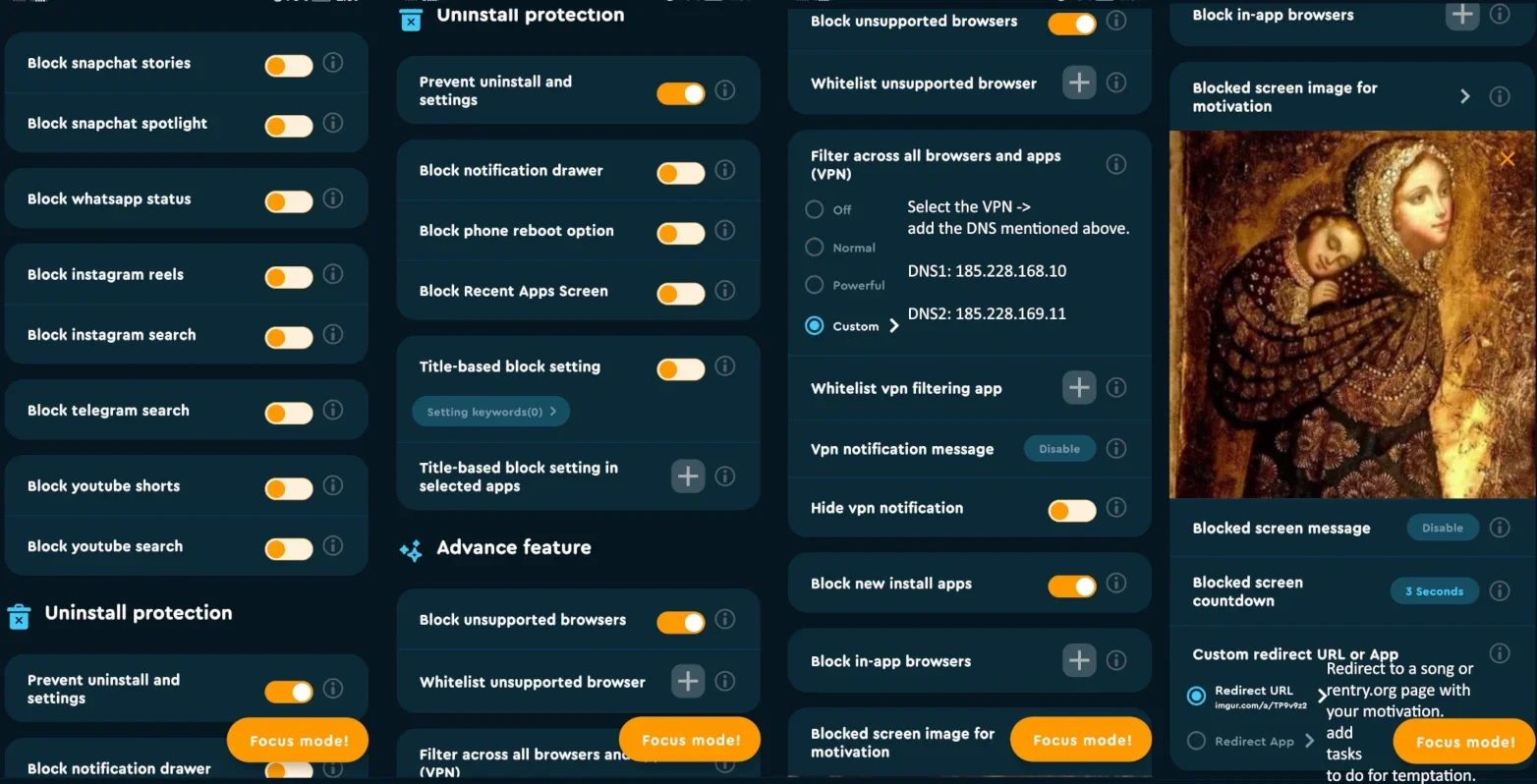
Select the VPN -> add the DNS mentioned below.
DNS1: 185.228.168.10
DNS2: 185.228.169.11
AND go to Brave Settings - > Brave Shields - > Use Secure DNS, And add :
https://doh.cleanbrowsing.org/doh/adult-filter/
Go to Brave Settings - > Brave Shields - > Content Filtering - > Create Custom Filters , and block more websites. Add the list of sites that you want to block, such as this, for quora, with this specific format, lower-case:
quora.com##html
AND add https://codeberg.org/1freelife1/FreeLife/raw/branch/main/~android_blocker~.txt to 'Add custom filter list'.
Then save and click on Update (top-right corner).
If this block didn't load and you can still access the sites from it, then either reinstall Brave or delete all its data from Settings - Clean Cache.
AFTER YOU CONFIGURED BRAVE, THEN ADD THE FOLLOWING KEYWORDS IN NOPOX.
WHEN YOU ADD THE KEYWORD 'BRAVE SHIELDS' , IT WILL LOCK 🔐 THE CONFIG MENTIONED ABOVE.
Configure the block with long sentence (first option), set a long sentence , and copy-paste it in the field each time it asks you for it.
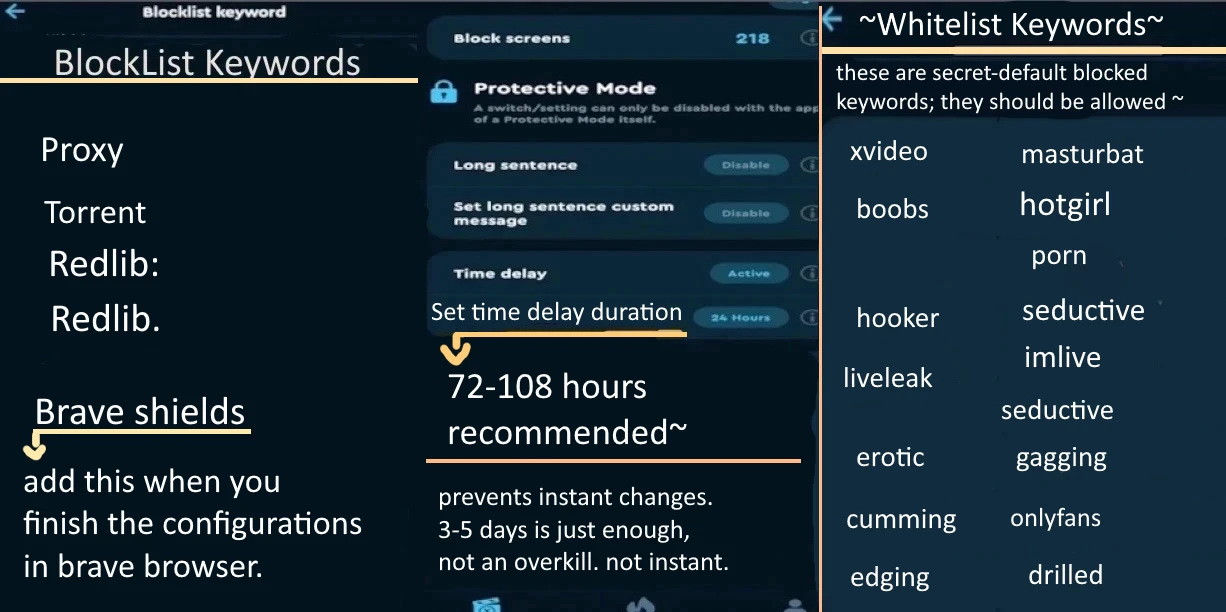
THEN, add all these keywords, and after you finish configuring this and the -focus mode apps, then switch to time-delay block.
You can also use the Focus Mode feature, as an widget, to block your phone for ~5 hours, when temptation hits.. lock it and flee from lust.
In that case, add a bunch of whitelisted apps, to listen to some music & be able to read some books & access the basic apps.
Make sure that in the Focus Mode you whitelist camera, messages, gallery, my files and 'android' - that is the background android app. Also Calculator, clock, music and some offline book readers.
🍀 NetherSX2, can be installed, for PS2 games.
🌟Extra - and Optional:
Another alternative to block the hosts file + a DNS would be DNS66 OR adaway , and then you would have to block only keywords , if need be, with something like NoPox, BlockerX, or digipaws/Curbox. the Hosts file and the DNS already block pretty much all the pron sites.
Don’t forget to share our project with your friends and on social media! 😊 Thank you!🌟
How to block Porn on IOS:
🌟First of all, install 💮OpenAppLock / foqos / Normal: Screen Time Control and block all the apps that you use to access pron, or uninstall them.
and then Install the Cleanbrowsing App and configure the adult filter and prevent uninstall.
Then Install Brave Browser.
Go to Brave Settings - > Brave Shields - > Content Filtering - > Create Custom Filters and block more websites. Add the list of sites that you want to block, such as this, for quora, with this specific format, lower-case:
AND add https://codeberg.org/1freelife1/FreeLife/raw/branch/main/~android_blocker~.txt to 'Add custom filter list'.
AND also check ✅ ' Pron Blocker - blocklist anti-pron', then click 'Update list' and save.
✨Bonus [optional] :
Install BREATHLY for daily pranayama.
You can try this configuration and block keywords via appcrypt ; etc ;
Jailbreaking can also be done, in order to modify the hosts file located in /etc/hosts with the one mentioned at windows category, above.
How to block Porn on MAC:
[🔐 - the block can be locked]
Install Brave Browser.
Go to brave://settings/shields/filters and click on 'Show Full list' and check ✅ ' Pron Blocker - blocklist anti-pron', then click 'Update list' and save.
Use the config mentioned at Windows, but configure it for MAC; Cold Turkey is supported, the hosts file and the DNS can be implemented too.
as for the registry, save this as BravePolicies.json :
and save it in /Library/Managed Preferences/com.brave.Browser.plist .
as for disabling Safe mode, set a Firmware Password. Utilities → Startup Security Utility → Firmware Password Utility. And hide it somewhere , email it to your future self [future mail] or give it to a friend.
You can also use this .sh script to block all the DNSes and ports except the ones used by Clean Browsing. Use this only AFTER you implemented the CleanBrowsing DNS.
Save this script as apply_firewall_mac.sh on Desktop. By pasting it in a notepad file, with the .sh extension.
then run this to run the .sh script. You would have to paste this command in the terminal, with admin priviledges.
Don’t forget to share our project with your friends and on social media! 😊 Thank you!🌟
Linux
[🔐 - the block can be locked]
Install brave Browser.
Go to brave://settings/shields/filters and click on 'Show Full list' and check ✅ ' Pron Blocker - blocklist anti-pron', then click 'Update list' and save.
Install 💮Focuser and configure it; or Open Turkey.
Ubuntu Christian Edition has an app called DansGuardian, you can install it on any Ubuntu-based distro.
Install this DNS with the steps given.
Configure it accordingly, as the steps mention.
download my hosts file mentioned at Windows and make it immovable, remove admin permissions.
🔰 Make a standard account without admin/sudo priviledges, to prevent yourself from undoing these settings.
Optional:
If you want to go even further, you can install KDE Plasma Desktop on your distro and then use Kwin with a simple rule such as:
or this, for multiple keywords at once.
Save this in a folder like: /usr/local/share/kwin/scripts/kill_by_keyword/contents/code/main.js.
replace "Tor Browser", "BlockedApp2", "BlockedApp3" with the keywords that you want to block.
then:
Move the scripts to root-owned directory , This will block users from deleting the scripts.
- Run kwin as root: | First, kill kwin:
killall kwin_x11 ~ for X11
or
killall kwin_wayland ~for Wayland
Then, set it as root:
For wayland:
sudo kwin_wayland --replace &
sudo startplasma-wayland
For x11:
sudo kwin_x11 --replace &
sudo startplasma-x11
Then on top of it you can use a GUI Firewall such as GUFW or KDE Firewall to make further changes, where you can do this simple trick where you Block all the internet traffick to all the apps EXCEPT your browser and some games and apps that you use. to do this:
open GUFW, go to Predefined → Application or Port/Program and add your trusted games, apps, browsers and so on;
then deny the Default Incoming/Outgoing Policy, so both Incoming and Outgoing would be 'Denied'. then enable GUFW and that's it.
Also allow the DNS in the firewall.
The browser would already be filtered by the DNS and the Hosts file and blocked keywords, from the DansGuardian app, and all the workarounds can be patched with Kwin and/or the Firewall. Use both.
You can also use this script to block other DNSes and ports except the ones used by Cleanbrowsing. Save as: apply_firewall.sh
plus more resources here. And use 🔹GNOME/UEFI Parental Controls. + Timekpr-nExT to lock the PC at times.
And these too work on Linux, Pluckeye, e2guardian, NxFilter ,alternatives Pluckeye.
Don’t forget to share our project with your friends and on social media! 😊 Thank you!🌟
