How to Decensor Snowbreak: Containment Zone
1. Download the Patch
Download the .pak file here:
https://files.catbox.moe/qojcp3.pak
2. Install the Patch
Navigate to your game directory:
SNOWBREAK\Game\Content\Paks
Copy the downloaded .pak file into that folder.
3. Enable Localization Setting
Make sure your localization value is set to 1 by following this guide:
https://rentry.org/begoneclouds
4. Launch the Game
Start the game normally.
If installed correctly, censorship should be removed and all interactives/functionality restored.
Troubleshooting
If the patch does not work:
Rename the File
Rename the .pak file to:
Patch_NonUFS-WindowsNoEditor_99_P
Create a Mod Folder
Inside:
SNOWBREAK\Game\Content\Paks
Create a folder named:
`mod
Move the renamed patch file into the `mod folder.
Final path example:
SNOWBREAK\Game\Content\Paks`mod
Nexus Mods
The 13kbs file at the top is enough to revert 90% of the changes but if you want everything restored
https://www.nexusmods.com/snowbreakcontainmentzone/mods/997 follow the instructions from the description
and
https://www.nexusmods.com/snowbreakcontainmentzone/mods/994?tab=description
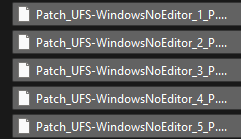
Restoring Base Outfits (apparently the first 4 files are enough)
Deleting the following files from the same Paks folder restores the base outfits: