How to "upsample" audio
[ Guide by @diablofx] [ contributors all welcome! ]
This tool is not designed for use with RVC Datasets; it serves as a useful standalone tool. While Audacity can do something similar, I find this method to be more effective. This can still be useful for extracting, using upscaled audio can achieve better results overall.
Step 1: Visit this Colab. If you have concerns about the security of your account, feel free to use an alt account. But this is entirely optional and not necessary.
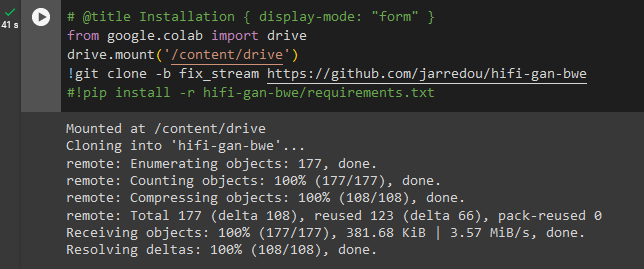
Step 2: Click on the "Installation" button. If prompted to grant permission to your Google Drive, allow it and wait for the process to complete.
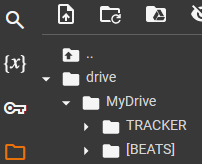
Step 3: Navigate to the "Explorer" tab on the left and locate your "MyDrive" folder. Then, drag and drop whatever file you want to upscale into the designated area. Or even better, upload your audio in your drive before that and refresh the explorer tab.
You might achieve better results if you split Vocals/Instrumentals first and then run both (combine them later)
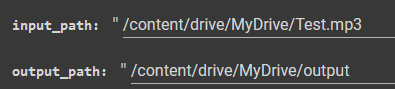
Step 4: After successfully completing the previous step, right-click on the file, copy its path, and paste it into the "input_path" box. Optionally, you can set a custom "output_path" as well. If left unchanged, the system will automatically create the folder for you.
Step 5: Set the Chunk Size to 10. However, feel free to experiment with different values based on your preferences.
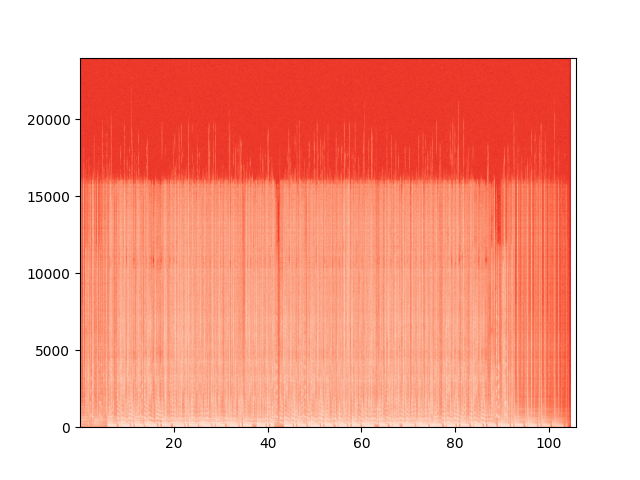
Step 6: Find the right cutoff using Spek or if you dont want to download anything, use Ilaria Audio Analyzer.
Simply upload your file and examine the spectrogram it generates to identify the optimal cutoff point.
If you know that all your files have the same cutoff, you can just link to the folder and batch process them.
Step 7: Once you did that, click the "Run" Button in the Inference Tab and wait for it to finish.
Step 8: Go to the Output folder and download your finalized upscaled output. Thats it!
Thanks for reading, any questions?
@diablofx in chat or dms
also shoutout to the HIFI-GAN+ implementation fork 