Pink - Body & Ghost | DELTARUNE
Instructions are written for SillyTavern only. Other Frontends should also work if they support the Regex system but do expect things to break.
🟢 Method 1 - Plug-And-Play (Recommended!)
Do not download Chub's version of the card, as it has the special features removed and to add to that - Chub strips out Regex files embedded within character cards. Instead, get the correct version here by downloading the image below. Simply import the file as a card in SillyTavern. Window may come up asking for confirmation of Regex importing - make sure to press "Yes".

🟡 Method 2 - Manual Installation
Alternative method is importing the Regex files yourself. Only do this if the first method doesn't work.
For this particular method of installation, you only need "All Regex Scripts (.zip)". After downloading the .zip, extract the files somewhere and proceed further down to see the step-by-step instruction.
📥 Downloads
| File | Description | Link |
|---|---|---|
| All Regex Scripts (.zip) | .zip File containing all 6 Regex files combined. | Download (.zip) |
| All Card Files (.zip) | .zip File containing entire card's assets. This is for the people who want to tinker with them or rewrite the card to work locally (by importing assets to "\characters" folder in ST directory and redirecting Regex paths to it). | Download (.zip) |
⚙️ Step-by-Step Guide
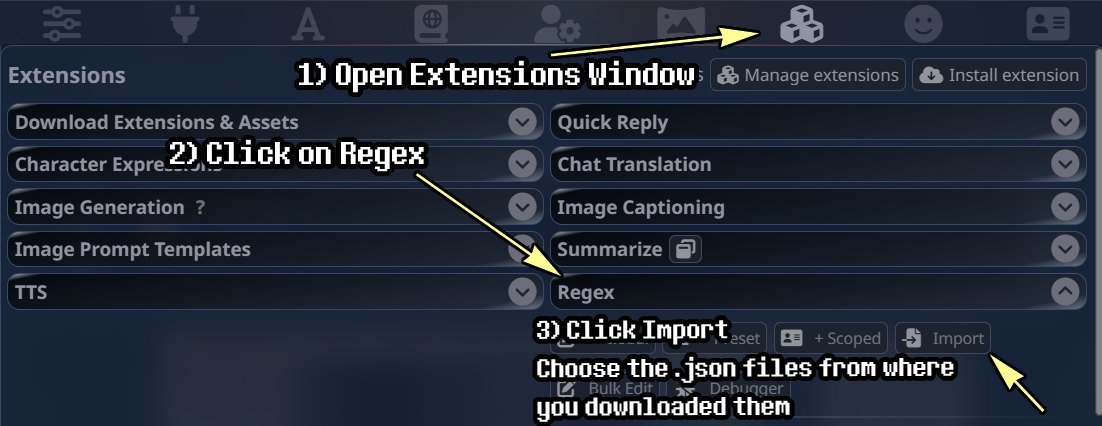
- Open chat with Pink, then click on the Extensions tab.
- Open the Regex dropdown menu.
- Click Import and select the
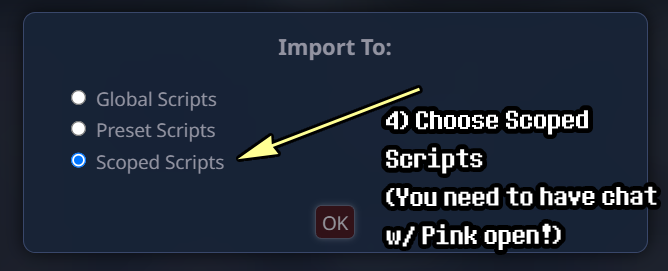
.jsonfiles you downloaded prior. - Select Scoped Scripts.
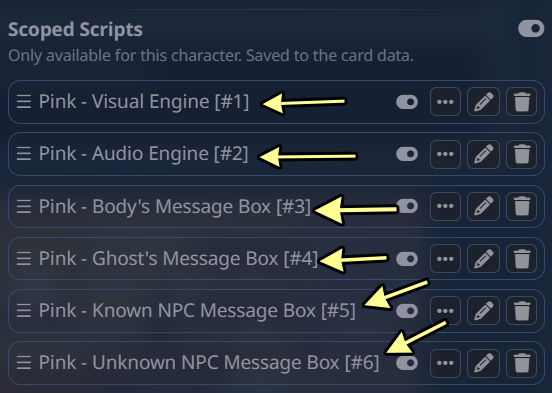
- Make sure Scripts are set in numerical order, like on screenshot below. If some are out of order, drag them in order using the triple-lines on the left.
Font Fix
Fonts in message boxes are broken and display incorrect font? Try this:
Import a custom font "8-bit Operator+", following the next steps:
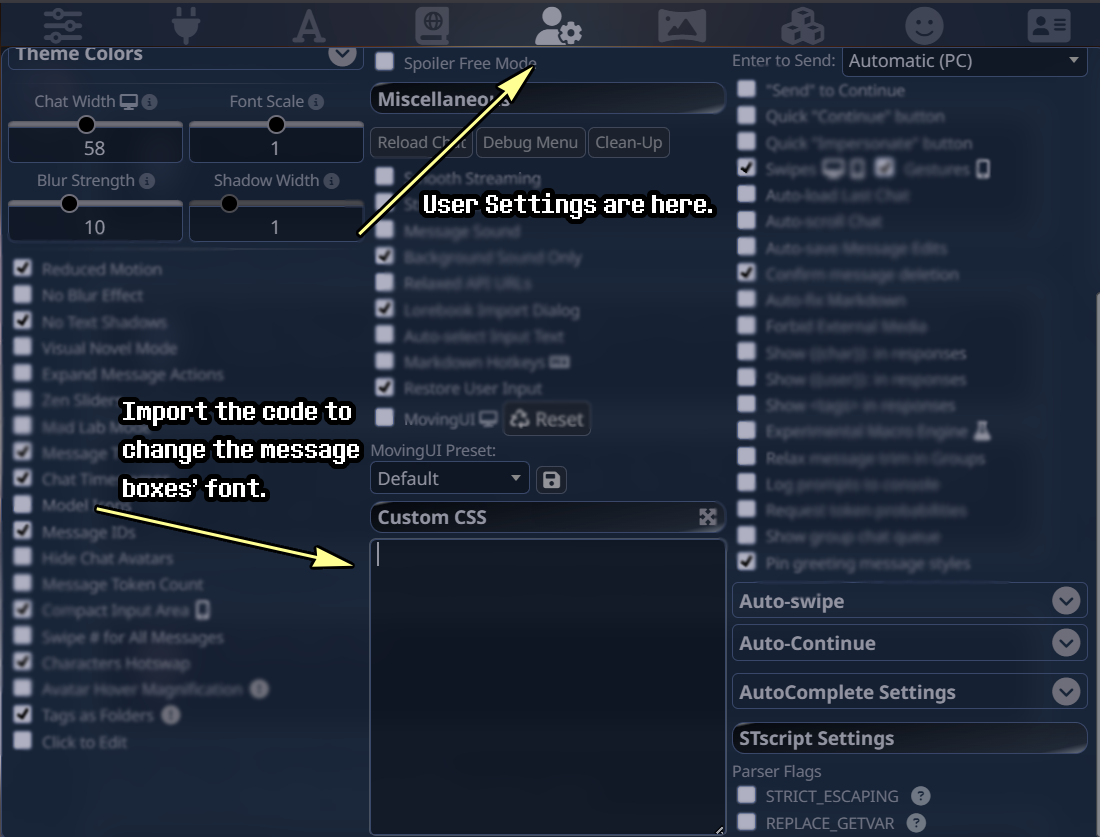
- Open
User Settings - Scroll to
Custom CSS - Copy and paste the next code in
Custom CSS. If you have other custom code there, it should be compatible, but still make sure to back previous one up beforehand just in case!
- If it's not on already, allow images to load by pressing a button with a little chain icon named "Ext. Media" and choosing "Always allowed".
- You're all set! Have fun! (˶ᵔ ᵕ ᵔ˶)
Card and Guide are written by Oddy_ | Chub | Botbooru | Discord: oddy._
Original Sprites, Music, SFX, Backgrounds and Characters originally belong to and created by Toby Fox and the team of DELTARUNE.
This project is an unofficial, non-commercial fan work.