Nubinu's Local Setup Guide
A practical guide for running local models.
Example model: Gemma4-E4B-MiniFantasy-V1
1. The Model
Gemma4-E4B-MiniFantasy-V1 is a 4-bit LoRA fine-tune built on top of MuXodious/gemma-4-E4B-it-SOMPOA-heresy, itself a fine-tune of Google's Gemma 4 E4B. It's tuned for collaborative fantasy roleplay: third-person narration, immersive character voice, and strong instruction adherence.
- My HuggingFace: Nubinu
2. What to Download
Backend: KoboldCPP
Download KoboldCPP here. Pick the right binary for your OS. Launch it once to confirm it opens cleanly before anything else.
The Model: GGUF Quant
You need a quantized GGUF of this model. Look for quantizations here:
Browse Quantizations for Gemma4-E4B-MiniFantasy-V1
Which quant to pick for the example model:
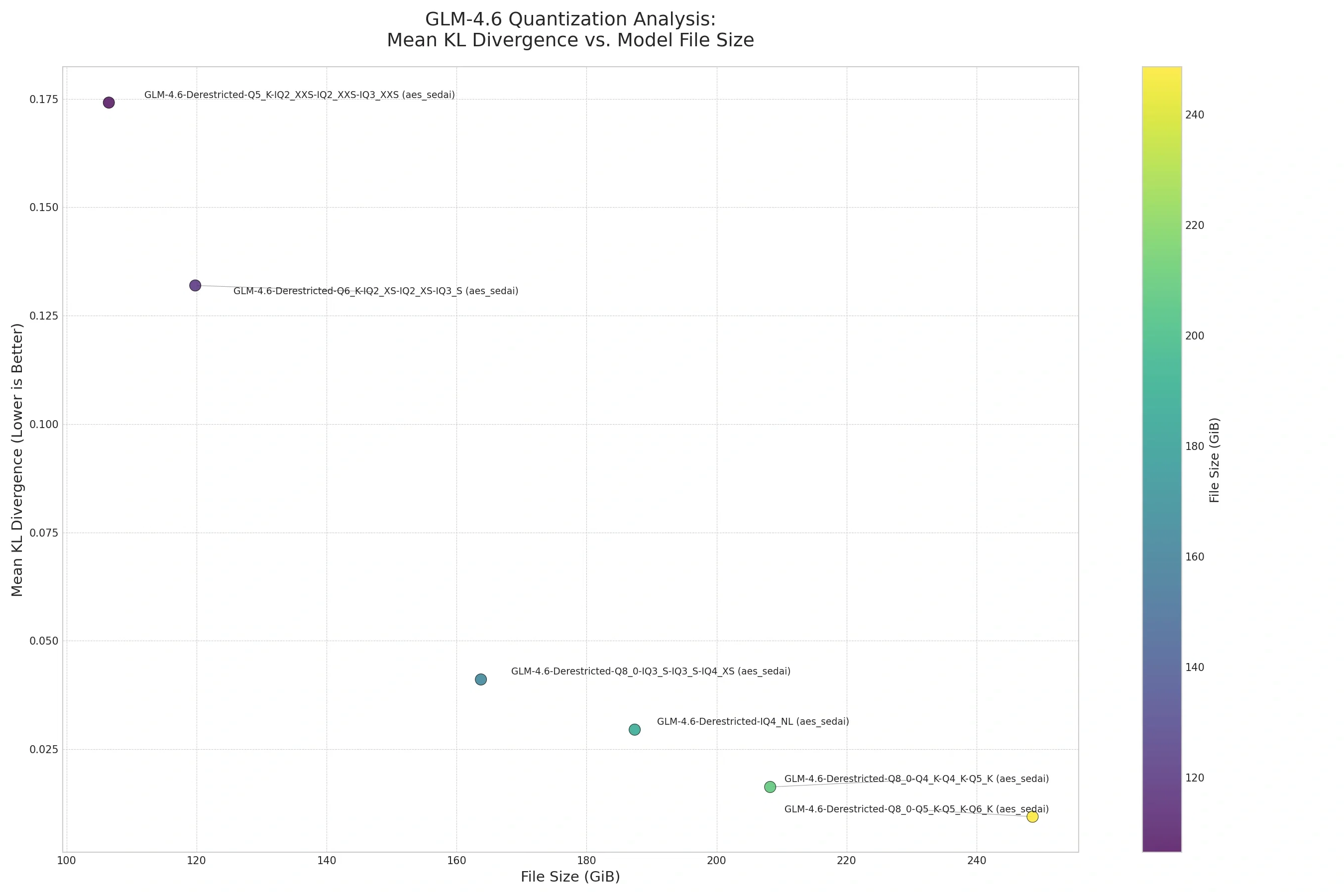
This graph shows the tradeoff between file size and quality. When I started with local models, I went to the BeaverAI Discord page to ask my doubts, and Aes Sedai posted this graph there.
The short version: Q4_K_M is the minimum. It keeps ~90% of model quality at the smallest viable size. Going below Q4 causes noticeable degradation (repetition, instruction failures).
3. Launching with KoboldCPP (Tensor Offloading)
The example model has 43 layers. Don't just split by layers. Use tensor offloading instead. This keeps all layers on GPU while offloading the heavy FFN matrices to CPU, giving you significantly better generation speed than partial-layer loading.
Base command (adapt paths as needed):
Tensor override options, ordered from least to most aggressive offloading. Pick based on your VRAM at Q8_0:
| Override | Best for |
|---|---|
| (none) | 8GB+ VRAM |
\.ffn_down=CPU |
6GB VRAM |
\.ffn_down\|\.ffn_up=CPU |
4 to 5GB VRAM |
\.ffn_down\|\.ffn_up\|\.ffn_gate=CPU |
3GB VRAM |
\.ffn_down\|\.ffn_up\|\.ffn_gate\|\.attn_(k\|v)=CPU |
2GB VRAM |
Rule of thumb: Fewer tensors on CPU = faster generation. Start with
ffn_downonly and offload more if you hit OOM.
4. Benchmarks (example model)
All benchmarks run on a 6 GB VRAM laptop (Q8_0, 43 layers, Ubuntu 24.04). You can test bigger models if you have sufficient VRAM and RAM.
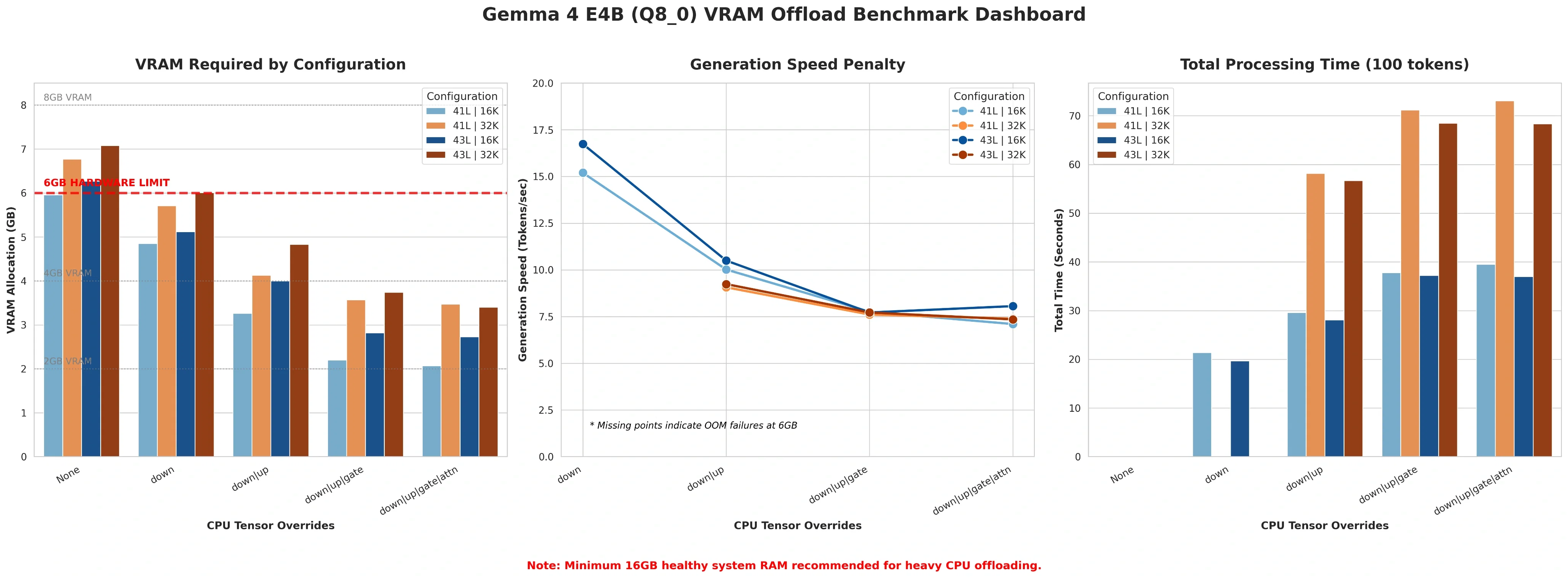
For 2 GB VRAM: use Q4_K_M + 16K context + max tensor offload.
43/43 GPU Layers, 16K Context
| Tensor Overrides | VRAM | RAM | Time | Prompt T/s | Gen T/s |
|---|---|---|---|---|---|
| None | ~6.27 GB ⚠️ | ~3.70 GB | OOM | n/a | n/a |
ffn_down |
~5.12 GB | ~4.81 GB | 19.67s | 1197 | 16.74 |
ffn_down\|ffn_up |
~4.00 GB | ~5.96 GB | 28.10s | 877 | 10.50 |
ffn_down\|ffn_up\|ffn_gate |
~2.82 GB | ~7.03 GB | 37.20s | 675 | 7.72 |
ffn_down\|ffn_up\|ffn_gate\|attn_(k\|v) |
~2.73 GB | ~7.10 GB | 37.00s | 662 | 8.06 |
43/43 GPU Layers, 32K Context
| Tensor Overrides | VRAM | RAM | Time | Prompt T/s | Gen T/s |
|---|---|---|---|---|---|
| None | ~7.08 GB ⚠️ | ~3.76 GB | OOM | n/a | n/a |
ffn_down |
~6.01 GB ⚠️ | ~4.81 GB | OOM | n/a | n/a |
ffn_down\|ffn_up |
~4.83 GB | ~5.96 GB | 56.68s | 714 | 9.24 |
ffn_down\|ffn_up\|ffn_gate |
~3.74 GB | ~7.04 GB | 68.50s | 589 | 7.72 |
ffn_down\|ffn_up\|ffn_gate\|attn_(k\|v) |
~3.40 GB | ~7.17 GB | 68.37s | 598 | 7.35 |
(41/43 layer tables also available on the model card.)
5. Sampler Settings
For the best narrative pacing and to keep the model from looping or going flat:
- General guide: SillyTavern Sampler Settings by Geechan
- My recommended preset for this model: Download Base_gemma4.json
Load the JSON in SillyTavern under Samplers > Import.
Quick values for other frontends (JanitorAI/Chub):
| Setting | Value |
|---|---|
| Temperature | 0.85 to 1.1 |
| Top K | 100 |
| Top P | 0.95 |
| Repetition Penalty | 1.03 |
| Frequency Penalty | 0.5 |
6. Character Card Format (for this model)
The model was trained on a category-based Markdown structure. Structuring your {{description}} block this way gives the best personality and lore adherence:
7. RP System Prompt
Bare Minimum (Recommended)
Recommended: Geechan's Universal Roleplay Prompts. The universal prompts pair well with this model.
8. Connecting to a Frontend
Once KoboldCPP is running locally:
| Frontend | Connection URL |
|---|---|
| SillyTavern (API) | http://localhost:5001/ |
| Chat Completion endpoint | http://localhost:5001/v1/chat/completions |
| API Key | secret (or leave blank) |
9. Remote Access (Mobile / Tablet)
To use your local model on a phone, localhost won't work. You need a public tunnel.
Cloudflare tunnel (easiest):
This outputs a URL like https://your-words-here.trycloudflare.com. Use it as your API endpoint:
Download cloudflared: github.com/cloudflare/cloudflared
Privacy note: SillyTavern + local model = fully private (nothing leaves your network). JanitorAI web + local model is not private. The website still processes text server-side.
10. Useful Links
Updated when new model versions release. Same logic applies to bigger models.