Krea2 guide
Todo:
Image upload services are all shitting themselves. Examples will load slow.
Basic gist.
Krea2 is a relatively new model series with open weights (means we can use it!)
It has a lot of the improvements that were outside of the reach of local for a while with the exception of maybe Flux, so text comprehension, positional comprehension, good natural language processing.
I thought it's censored, can it do titties??
Krea's censor is a layer that can be disabled with a lora. It is only realistically passively censored by not target training on a lot of porn, so a lot of those concepts will naturally be missing. Lora training is very effective (if expensive and sadly unfeasible locally for most people), so concepts can get introduced rather well.
You can expect the current state of Krea + Loras to do really clean pin-up shots, maybe some penis in vagina, but with a lot of sex concepts not being very complex.
Why do I care?
Krea is really nice for bases. You can refine an image afterwards through i2i/inpainting in one of the SDXL models. Krea is also a lot of fun to prompt with for anything from shitposting to just testing if it knows how to generate. Krea Identity Edit is one of the cleanest ways to do stuff like add text to gens locally.
How slow is it? What requirements?
The versions I'm showcasing want 3000 series cards at least, with 12gb vram. There are quants and versions that run on lower hardware but you will need to seek those out for yourself. Due to using the turbo model, speeds are generally around SDXL level, so not that bad actually.
Doesn't turbo suck?
The Krea model is primarily tuned towards the turbo model for actual inference. You are expected to use it. The major downside I have encountered is some general issues with i2i upscaling using krea. It adds splotches akin to lightning/turbo models you may be familiar with from SDXL. On the plus side you can also raw generate your image at your desired resolution no problem, so the need for hiresfix/i2i upscaling can be alleviated somewhat.
I hate natural language boomer prompting
Use caveman prompting™
Download links:
Use ComfyUI or an updated Forge Neo. Reforge doesn't work.
krea2_turbo_int8_convrot.safetensors
qwen3vl_4b_fp8_scaled.safetensors
qwen_image_vae.safetensors
On Forge Neo: 1 goes into "Stable-diffusion", 2-3 go into "text_encoder". Once you are in the UI you change the preset in the top left to Krea. You then add both Qwen's to the VAE/Text encoder box.
Uncensor:
There's several uncensors, this works.
Uncensor
You activate this like a normal lora.
Kroma:
Current Kroma (Lodestones Furry concept lora for Krea2) extract:
The current furry finetuning once again happens by Lodestone, you can follow the progress and the models here:
Kroma Merge
Lodestone is using the full Krea model which we really don't run locally. Since we run the int8 version we are instead using a lora extract of said finetunes from here:
Kroma0.2
Other Furry related loras:
Civit search for Furry
Due diligence with Civit is to ask yourself if what you are seeing looks like SDXL, in which case it is probably trained to replicate the SDXL AI style first and foremost (very popular over there).
Some notables I tested:
krea2 Furry
Seemed to have been trained on east asian / chinese stuff. Examples look fairly SDXL coded. I've had some luck with it on a 0.3-0.5 weight to support some anatomy.
Other Loras:
Civit search for Style
Generic style loras work quite well and can make anthros look pretty neat.
Notable merges:
There's several human focused normie merges meant to pornify krea. I'm using this one for some basic NSFW knowledge on top of kroma. Does not seem to deteriorate the base model by much. If unsure just use the base krea.
Lustify
Prompt examples
The Forge Neo krea preset will set these.
Resolution: 1152x832
Steps: 8
Sampler: Euler
Schedule: Simple
1girl standing example.
Catbox broken, will need to look for different host
Prompt:
A shortstack kobold with detailed shiny scales and thick fur.
Her scales transition into fluffy fur.
Her body is completely white and albino-like. Her tail is thick.
Her scales are very detailed, with individual scales visibly rendered.
She has red eyes and wears a victorian gothic dress.
Her breasts are covered in fur with her corset pushing her cleavage up.
She has [purple,:0.6] horns and [purple,:0.6] nails, and a draconic face.
Her ears are furred and pointing to the sides of her head.
She is on all fours, with her butt in focus.
Her pussy and anus are pink.
The background features a red sky and full moon.
She has 4 fingers.
Her expression is playful and happy.
The style of the image is evocative and deeply detailed illustration. DLSR camera.
<lora:kroma-v0.2-0.3-base-lora-custom-blend-no-reupload:0.8>
<lora:krea2filterbypass3:1>
<lora:BigNats v1:0.3>
I call this caveman prompting because the sentences are short and avoid some of the annoying purple prose you see usually. There is evidence that purple prose does make images 'artistic', but it is very subjective if that is ultimately a good thing. Point being that if you hate NLP you can create short repeatable sentences instead.
Some notes:
Big naturals lora (random titty lora off of civit) basically required to get larger chests. Some prompts didn't stick like 4 fingers. It does not know what a shortstack is.
TODO: More examples, text boxes, positional examples.
Inpainting and I2i
Turbo models have some issue with noise when working on an image that already exists. Generally speaking you want very low denoises and steps.
Tip: In Forge Neo add quicklinks to important toggles like so.
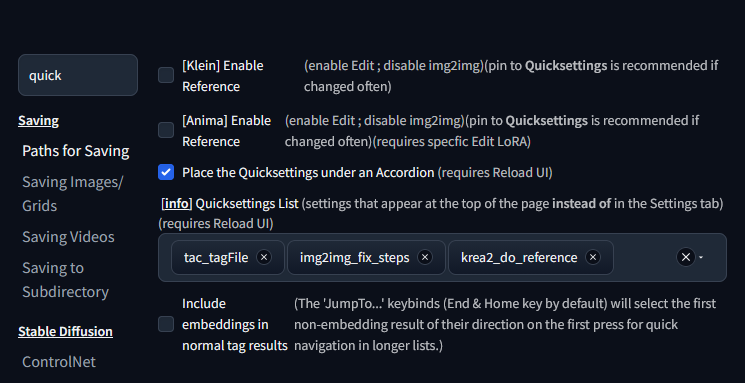
Important for inpainting is the 'actual steps' one here. Inpainting on Krea2 Turbo works best with ~2 steps and ~0.2 denoise. Since we want to inpaint for 2 actual steps we set the steps to 2, then toggle 'During img2img, do exactly the number of Steps the slider specifies'. This means we ensure we always run 2steps regardless of our denoise setting.
(By default the denoise will determine the fraction of steps, for example a denoise of 0.3 would, when given 30 steps do 30%, so 9 steps. We really want the exact number.)
For upscaling these numbers can work too, from my experience it cooks the image too hard due to Turbo shenanigans. I have better luck trying to regenerate the image on the larger resolution on the same seed. It will look different but it's workable. Alternatively you can upscale on SDXL, but a lot of the consistent detail from krea backgrounds go poof.
Krea Identity Edit
Krea Identity Edit is a specific inpainting process that lets us selectively edit images in a way you may be familiar with from corpo models like Nano Banana. "Add a text box here, turn this from day to night" etc.
This is very useful even if you don't give a fuck about Krea gens themselves. Very nice for adding text that looks organic to the image.
Krea2 Identity Edit
Pick the lora version that you think you can fit best. It does gen noticably slower for me if I use the full version because I'm hitting Vram limits. Up to your setup.
Forge Neo has a toggle to activate this method. Toggle 'Krea2 Enable Reference' in settings, add it to quick links like shown in the previous section if you use it a lot.
Go to i2i/inpainting, add other loras you may be using like the bypass and style/knowledge loras.
Change your prompt to be specific about what you want changed and remove everything else.
"Change the scene from day to night. Add a speech bubble with the stylized handwritten text: "This is a test!" next to the character."
Denoise 1.0
When inpainting 1024x1024 will work fine. Padding as necessary, I usually put it to 256.
Due to being really slow for me on large images I mostly use this for inpainting and not i2i, unless I would i2i a 1megapixel image. This is a case where ComfyUI has more features, you can also provide reference images or do basic style transfers.
Other applications:
- Provide image of your epic furry OC.
"Make this character sit cross legged at a beach. Make them raise their arms in joy." + Whatever else you prompt for stylization.
Works better than you might think, especially if you have some SDXL lora of the char and refine over there.
Random quirks and biases
- Emphasis (tag,:1.2) does not work.
- Very tuned towards 5 fingers.
- Inpainting and I2i issues with the turbo model.
- Short prompts are very creative, long prompts see barely any seed variety.
- Sex has an even bigger issue with biasing shallow penetration than SDXL models did.
- Pussies look AWFUL YUCK.
- Browsing Civit in the Krea section is genuinely a blast, like what is this man