 Golden Black Profile Template
by Ironicinnit
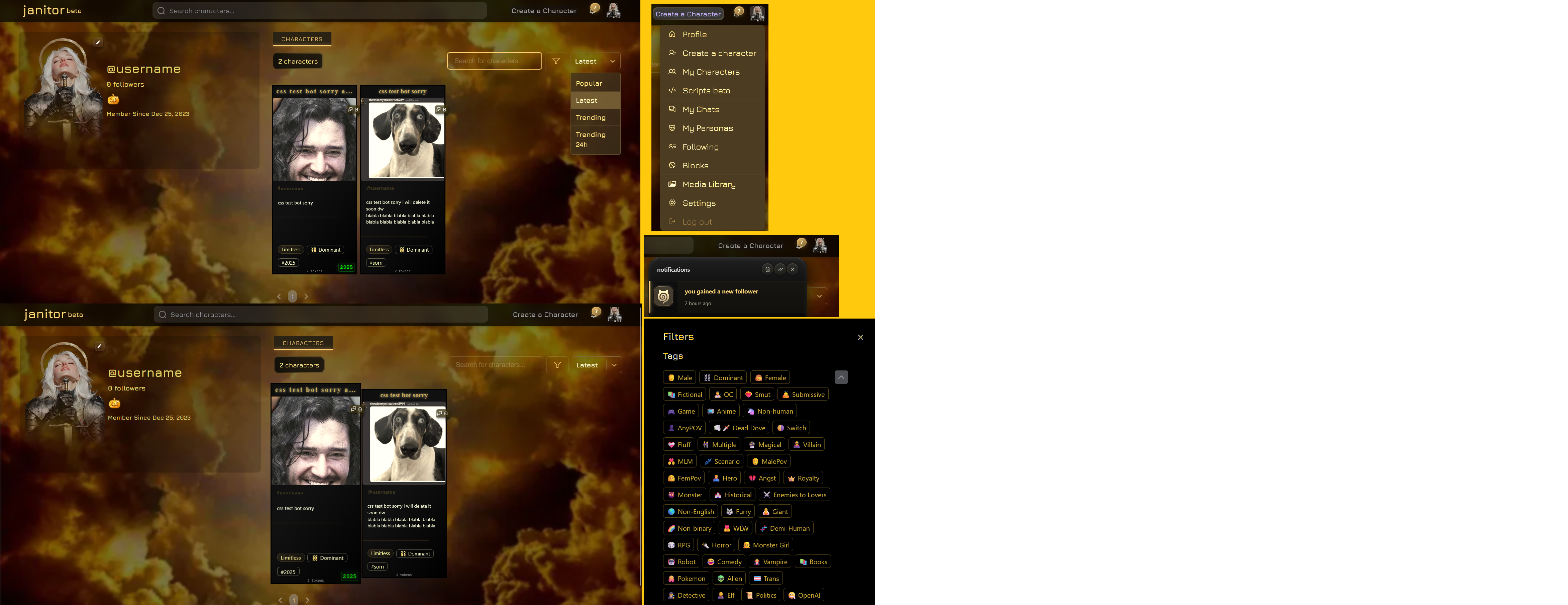
You don't want your profile to be too flashy, but you don't like the original look / want to spice it up with something simple? Then Golden Black is for you!
Desktop view:
Mobile view:
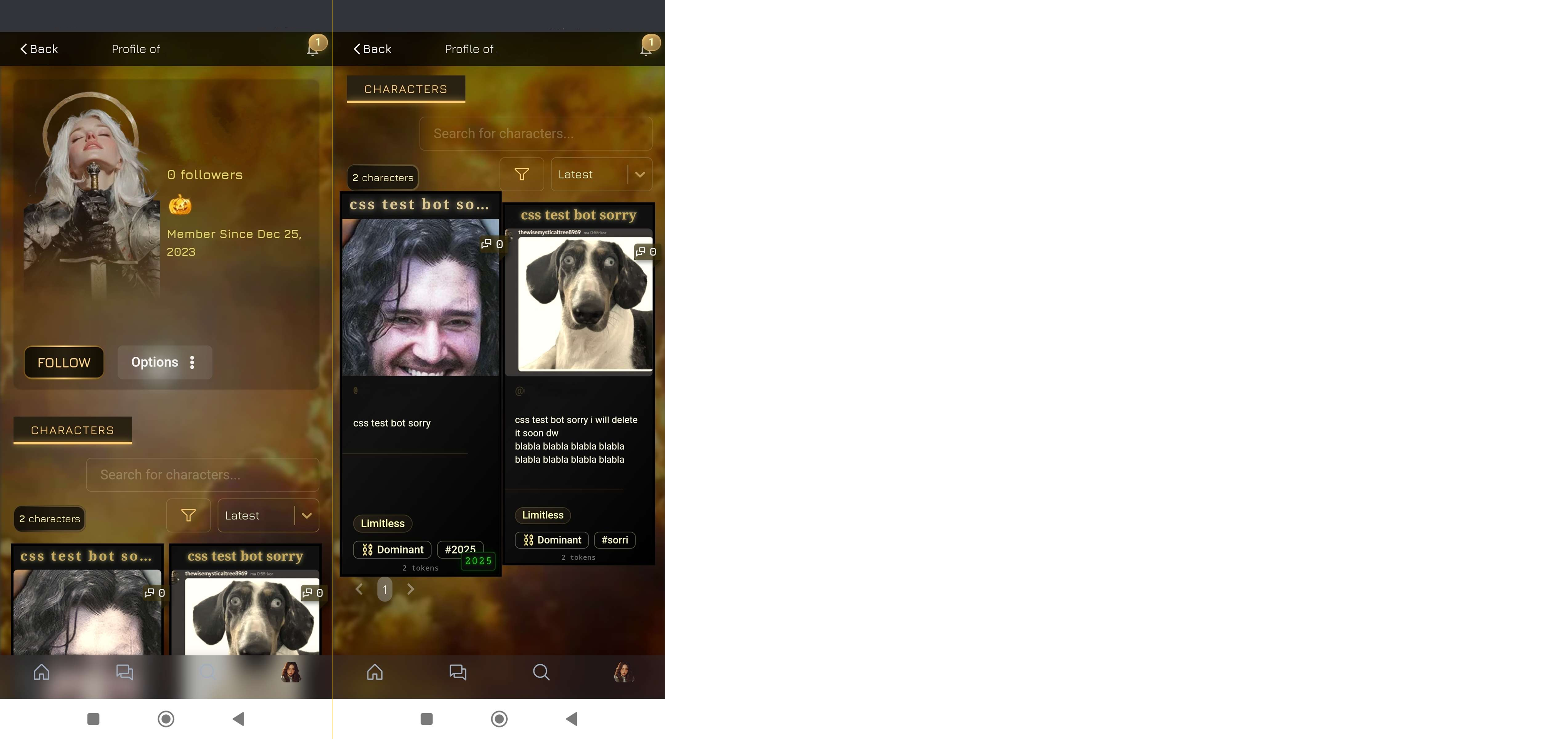
The username will be visible on mobile, I just censored my css testing pf that's why you can't see it on the screenshots! A few things might be different since the site had some updates!
FAQ
- It looks familiar, where have I seen it?
The template was highly inspired by my own profile.
- Can I use this code to create my own template?
NO, you can't! I don't give permission to publish my code as a template, or in any other way where the publisher claims the code as theirs!
If you use only a few parts from the code and give credits then it's fine.
- Can I change this code to make it fit my style?
Absolutely! Just remember that giving credit for the code is still required. If you're unsure how to edit the CSS/HTML, feel free to contact me, and I'll be happy to edit it for you (or use the css channel on the JAI dc server)!
- What if I remove or don't give credit?
Following JAI's new CSS policies, you must give credit for using any part of my code. If you don't, I can and will report your profile to the moderators. Refusing to give credit may result in the permanent disabling of your ability to use CSS.
If you happen to see someone using my template without credit, please gently remind them to give credit. Seriously, don't be disrespectful.
Before using this code
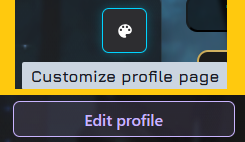
First, you have to go to your profile and edit your text color and background. Click on the "Customize profile page" palette icon, set the text color and background image, then click on the "Edit profile" button and finally on the "Save Changes" button!
If you already have CSS/HTML, please save it into a text/note file before using the "Edit profile" button (in case it gets overwritten)!
Text color: #e0d468
You can set your background color to any color, but do not make it transparent!
Background Image (from Pinterest, but I edited it so you can download it if you click here):

Set Opacity to 100% and Blur to 2%!
Good to know
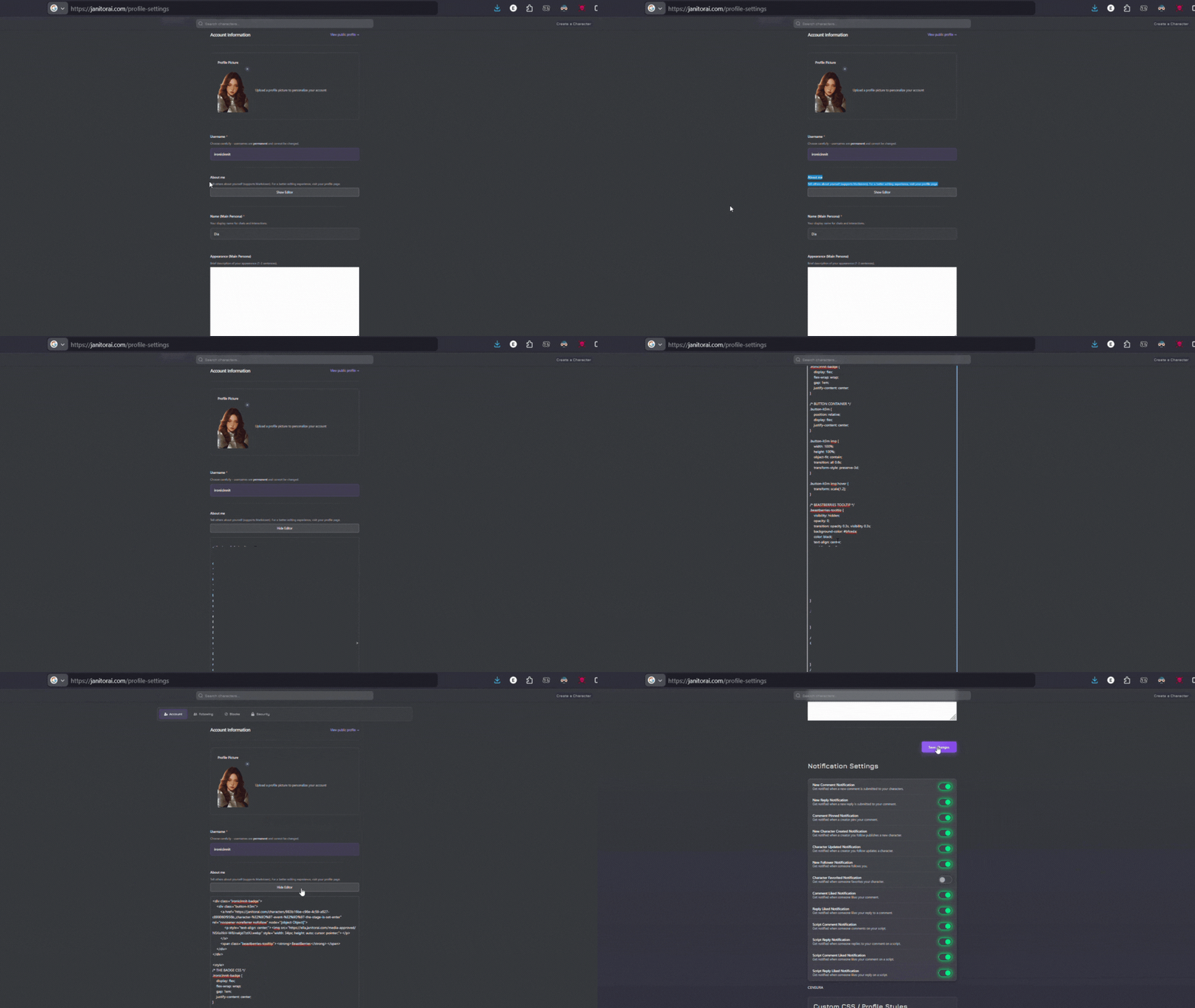
You have to go to Profile Settings. Copy the code below and paste it into the About Me; "Show Editor" section.
- Please only edit your profile within the Settings menu. Do not use the purple "Edit Profile" button, as this action will erase your existing code. Also, I strongly advise against using the built-in CSS editor; it is known to be buggy and removes the /* comments */ from your code, making the About Me section in Settings the more reliable option.
- If you have previously used the purple "Edit Profile" button to edit your CSS/HTML, please save it into a text/note file first before using my code (in case your previous code becomes buggy or causes issues)!
This is how you can do it:
The Code
(Copy the whole code manually, or you can copy it by clicking on the icon in the top right corner of the code!)
1 2 3 4 5 6 7 8 9 10 11 12 13 14 15 16 17 18 19 20 21 22 23 24 25 26 27 28 29 30 31 32 33 34 35 36 37 38 39 40 41 42 43 44 45 46 47 48 49 50 51 52 53 54 55 56 57 58 59 60 61 62 63 64 65 66 67 68 69 70 71 72 73 74 75 76 77 78 79 80 81 82 83 84 85 86 87 88 89 90 91 92 93 94 95 96 97 98 99 100 101 102 103 104 105 106 107 108 109 110 111 112 113 114 115 116 117 118 119 120 121 122 123 124 125 126 127 128 129 130 131 132 133 134 135 136 137 138 139 140 141 142 143 144 145 146 147 148 149 150 151 152 153 154 155 156 157 158 159 160 161 162 163 164 165 166 167 168 169 170 171 172 173 174 175 176 177 178 179 180 181 182 183 184 185 186 187 188 189 190 191 192 193 194 195 196 197 198 199 200 201 202 203 204 205 206 207 208 209 210 211 212 213 214 215 216 217 218 219 220 221 222 223 224 225 226 227 228 229 230 231 232 233 234 235 236 237 238 239 240 241 242 243 244 245 246 247 248 249 250 251 252 253 254 255 256 257 258 259 260 261 262 263 264 265 266 267 268 269 270 271 272 273 274 275 276 277 278 279 280 281 282 283 284 285 286 287 288 289 290 291 292 293 294 295 296 297 298 299 300 301 302 303 304 305 306 307 308 309 310 311 312 313 314 315 316 317 318 319 320 | <style>
/* === CHARACTER CARD === */
.profile-character-card-wrapper:hover {
transform: translateY(-5px);
transition: 500ms ease;
box-shadow: 0 10px 20px rgba(0, 0, 0, 0.5);
z-index: 10;
}
.profile-character-card-wrapper:hover .profile-character-card-avatar-image {
transform: scale(1.04);
}
.css-nlxhw4 {
padding-top: 0;
padding-bottom: 0;
}
.profile-character-card-name-box {
font-size: 1.1rem;
font-weight: 700;
margin-bottom: 4px;
}
.profile-character-card-creator-name-link {
display: block;
padding: 0 12px;
font-size: 0.85rem;
color: #a0a0b0;
margin-bottom: 8px;
}
.profile-character-card-description-box {
padding: 0 12px;
font-size: 0.9rem;
color: #c0c0c0;
line-height: 1.4;
max-height: 60px;
overflow: hidden;
margin-bottom: 10px;
}
.profile-character-card-tags {
padding: 0 12px;
margin-top: auto;
}
.pp-cc-tags-item:hover {
background-color: #3a3a45;
}
.profile-character-card-star-line {
display: flex;
justify-content: center;
margin: 8px 0;
opacity: 0.3;
}
.profile-character-card-star {
width: 14px;
}
.css-ivr2t2 {
color: #FBE7D1;
}
.pp-cc-name {
transition: ease-in-out 0.5s;
}
.profile-character-card-wrapper:hover .pp-cc-name {
text-shadow: 0px 0px 8px #ebdeb7f5;
color: rgb(223, 200, 142);
}
.profile-character-card-wrapper:hover {
transform: scale(1.04);
box-shadow: none;
}
.css-1s5evre:hover {
transform: scale(1);
}
.css-1s5evre {
border-radius: 0px;
outline: 3px solid black;
background-color: black;
background: linear-gradient(310deg, black, #111111, #0f0f0f);
}
.profile-character-card-stack-link-component {
display: flex;
flex-direction: column;
}
.profile-character-card-stack-link-component-box {
text-align: center;
}
.pp-cc-name {
transition: ease-in-out 0.5s;
}
.pp-cc-name {
transition-duration: 0.1s;
color: rgb(203, 170, 88);
font-family: "Agdasima", serif;
font-size: 16px;
text-shadow: 0 0 5px #e6e2a9ba;
text-transform: none;
}
/* bot's bio */
.css-199gcrh {
filter: sepia(100%) saturate(200%) brightness(120%);
}
.css-1s5evre {
border-radius: 0px;
outline: 3px solid black;
background-color: #000000;
background: linear-gradient(310deg, black, #111111, #0f0f0f);
}
.css-96l1id {
color: #75632c;
}
.pp-cc-star {
position: absolute;
right: -45px;
top: -38px;
visibility: hidden;
}
.pp-cc-tags, .pp-cc-tags-regular, .pp-cc-tags-custom {
filter: sepia(1) saturate(2); }
.css-6su6fj {
filter: sepia(1) saturate(2);
}
.css-1m151rf, .css-9pz3h, .css-vquwtv {
color: #3d361e;
text-shadow: 0 0 5px #00ff0000;
font-size: 12px;
}
._content_1chl9_11 {
background: #3d300aad;
}
/* og bot card color to transparent */
div:has(> .css-1s5evre),
div:has(~ .css-1s5evre) {
background: transparent !important;
}
.profile-character-card-avatar-image {
filter: sepia(40%) saturate(100%);
transition: filter 0.3s ease;
}
.profile-character-card-star-line {
border-top: 1px solid rgba(224, 169, 64, 0.6);
}
.css-1henxb {
background: transparent;
}
/* === END OF CHARACTER CARD === */
/* === PROFILE DECORATIONS === */
/* latest menu */
.css-1bmggo3 {
filter: sepia(1) saturate(2);
z-index: 1000;
}
.react-selectcontrol {
background: transparent;
height: 40px;
filter: sepia(1) saturate(2);
position: relative;
z-index: 1000;
}
.react-selectcontrol:hover {
filter: sepia(1) saturate(2);
z-index: 1000;
}
.css-1cdqd3a {
filter: sepia(1) saturate(2);
z-index: 1000;
}
.css-1w58nos .css-70qvj9 {
border: 1px solid rgb(143, 118, 69);
box-shadow: rgb(143, 118, 69) 0px 1px 1px 1px;
}
.css-wd8hou {
filter: sepia(1) saturate(2);
z-index: 1000;
}
/* char counter */
.css-dh2zqo {
width: auto;
filter: sepia(100%) saturate(200%) brightness(150%);
}
.css-1lgnt2x, .css-xr5j9y, .css-nackew, .css-1ov83hg, .css-1pjvf4r {
border-top: 1px solid #75632c;
width: 80%;
position: relative;
box-shadow: 0px 0px 5px #824b08;
}
.css-1fcg30q, .css-1hnyrhn {
font-size: 0.5rem;
font-family: 'Share Tech Mono',monospace;
color: rgba(255,255,255,0.6);
letter-spacing: 0.3px;
line-height: 1;
opacity: 0.8;
text-shadow: 0 1px 1px rgba(0,0,0,0.6);
}
.css-i3ef4m {
filter: sepia(1) saturate(2); }
.css-1bmggo3 {
filter: sepia(1) saturate(2); }
.transparent .react-select__control {
background: transparent;
height: 40px;
filter: sepia(1) saturate(2);
}
.react-select__control:hover {
filter: sepia(1) saturate(2);
}
.css-1cdqd3a {
filter: sepia(1) saturate(2); }
.css-1w58nos .css-70qvj9 {
border: 1px solid rgb(143, 118, 69);
box-shadow: rgb(143, 118, 69) 0px 1px 1px 1px;
}
.css-wd8hou {
filter: sepia(1) saturate(2);
}
.css-1ket5wn {
top: 6px;
}
._headerActions_fdp8b_151 {
display: flex;
align-items: center;
gap: 2px;
filter: sepia(1) saturate(2);
}
._content_14dgz_110 {
filter: sepia(1) saturate(2);
}
._unreadIndicator_14dgz_23 {
filter: sepia(1) saturate(2);
}
._notificationsBadge_fdp8b_41 {
filter: sepia(1) saturate(2);
}
._archiveButton_14dgz_196:hover {
filter: sepia(1) saturate(2);
}
._avatarSection_14dgz_37 {
filter: sepia(1) saturate(1);
}
.css-cs40yc, .css-ob25lu, .css-1soqvfm {
filter: sepia(1) saturate(1);
}
.glow-on-hover::before {
filter: sepia(1) saturate(1);
}
.glow-on-hover {
filter: sepia(1) saturate(2);
}
.css-1s5evre:hover .profile-character-card-avatar-image {
filter: sepia(0) saturate(1);
}
.pp-pg-total {
background-color: #00000069;
}
/* pf bio color */
.pp-cc-wrapper, .pp-cc-wrapper > div:empty {
background: #0000000d !important;
}
.pp-uc-background, .pp-uc-background > div:empty {
background: #0000000d !important;
}
.pp-top-bar {
background: #000000BD;
}
/* menu background by @tigerdropped */
#root ~ *:has(> .profile-filter-modal-modal-overlay) [data-focus-lock-disabled] > * > * {
background: black !important;
}
.pp-top-bar-app-menu-list {
filter: sepia(1) saturate(2);
}
.pp-top-bar-app-menu-list-item:hover {
background: #000000BD;
}
._notificationsPopover_fdp8b_75 {
background: #000;
}
._contentWrapperUnread_14dgz_127 {
background: #8f823f0d;
}
.pp-uc-avatar {
height: 250px;
width: 190px;
}
/* pfp borders to transparent */
.css-18bnokj {
box-shadow: rgba(0, 0, 0, 0) 0px 0px 0px 1px,rgba(0, 0, 0, 0) 0px 5px 10px,rgba(0, 0, 0, 0) 0px 15px 40px;
}
/* fade to bottom of the pfp */
.css-18bnokj {
mask-image: linear-gradient(black, black, transparent);
}
/* neon characters text */
.chakra-tabs__tablist, .pp-tabs-wrapper, .profile-tabs-wrapper, .css-1ixn8qf {
filter: sepia(1) saturate(2);
}
/* notifics */
._notificationsPopover_wpa9q_80 {
background: linear-gradient(310deg, black, #111, #271f06);
}
._unreadIndicator_di476_23 {
background: linear-gradient(180deg, #cccc39 0%, #b8850c 50%, black 100%);
}
._contentWrapperUnread_di476_132 {
background: #ffcb001a;
}
._notificationItem_di476_2:hover ._characterAvatar_di476_67 {
box-shadow: 0 4px 16px #ffff0017,0 0 0 2px #ffff001c;
}
._notificationItem_di476_2:hover ._userAvatar_di476_82 {
box-shadow: 0 4px 16px #ffff0017,0 0 0 2px #ffff001c;
}
._notificationsBadge_wpa9q_41 {
background: linear-gradient(135deg,#ffdf80 0%,#ab9336 50%,#715a00 100%);
}
.diacredit { /* DELETE THIS AND ILL SEND ALL THE BAD KARMA AFTER YOU! */
position: absolute;
opacity: 40%;
top: -36px;
</style>
</style>
<div class="diacredit"><span style="font-size: 10px; color: #cc9f2d;">css by<a href="https://janitorai.com/profiles/d429f8a8-cacd-4daa-bb57-8e6f5dc26cb8_profile-of-ironicinnit"; style="font-size: 10px; color: #cc9f2d;"> @ironicinnit</a></span></div>
|
PS:
Tbh most of the time I forgot to write a note/title, so if you want to edit it and can't find something, then use this Rentry for help:
https://rentry.co/jaielements
Also, I never learned anything about coding or CSS, so the code might not be perfect(bad as hell), but it works and looks just like in the pictures! Let me know if something not working or buggy/glitching!
If someone wants to fix it or delete parts that are not needed in the code, I would be soooooo thankful 😭🤍
- Some of the CSS is from Gemini lmao, but mostly it's from me. If it's from someone else, then I gave credit to them in the code; do NOT remove those credits!!
Also, this rentry layout was highly inspired by Lav's template rentry!!
Last update:
16 May 2026
Updates:
- Character counter
- Holidays2025 event bot card
- Notifics
- Neon "Characters" box