High-Bandwidth AMD Server Build for Local LLM Inference
(CPU-Optimized NUMA Build Guide)

Running very large parameter language models locally presents a fundamental challenge:
Fast inference requires massive memory bandwidth.
There are three primary architectural approaches to solving this problem:
- Stack multiple GPUs for high GDDR bandwidth
- Unified memory architectures (UMA) such as Apple Silicon
- High-channel-count CPU NUMA systems (dual-socket EPYC)
This guide focuses on the third approach: a dual-socket AMD EPYC Genoa system with 24 channels of DDR5-4800, delivering approximately 920 GB/s of theoretical memory bandwidth.
Approach Comparison
1. Multi-GPU Systems
Stacking GPUs provides extremely high memory bandwidth via GDDR, but introduces practical limitations.
Challenges
- Power consumption
- Easily exceeds what a standard household breaker can support
- Often requires 1600W+ PSUs or multiple power supplies
- Cooling requirements
- Significant airflow needed
- Systems become noisy and generate substantial heat
- PCIe lane limitations
- Limited slots and bandwidth
- Workarounds include risers, split slots, mining frames — but these increase complexity
- Cost
- High-VRAM GPUs are extremely expensive
- Example: 80GB-class cards can exceed $15,000
- VRAM constraints
- Even if the model fits, combining:
- Model weights
- Large context windows
- TTS models
- Image generation models
- ...often leads to out-of-memory errors
- Even if the model fits, combining:
Advantages
- Extremely fast inference if fully contained within VRAM
- Excellent for training workloads
- Minimal need for offloading or quantization compromises
2. Apple Silicon (Unified Memory Architecture)
Apple Silicon provides large shared memory pools in a compact system.
Advantages
- Quiet and compact
- Stylish, well-integrated hardware
- Shared CPU/GPU memory model
Limitations
- Less supported architecture overall
- Metal performance often below theoretical expectations
- Memory is soldered and not upgradeable
- Limited PCIe expandability
- Cannot fully utilize all available memory for inference
- Prompt processing performance can be slow
- macOS ecosystem constraints
- Cost comparable to other approaches, with less flexibility
3. CPU-Centric NUMA Architecture (EPYC)
This is the approach used in this build.
Overview
- Dual-socket AMD EPYC Genoa
- 24-channel DDR5-4800
- ~920 GB/s aggregate bandwidth
- Fully populated RAM slots
Upfront Investment
- Approximately $6,000 USD (at time of writing)
- Requires filling all memory channels for maximum bandwidth
- Upgrading memory typically means replacing all modules
Advantages
- 384GB / 768GB / 1.5TB+ RAM configurations are practical
- Extensive PCIe lanes for expansion
- Strong general-purpose compute (VMs, labs, parallel builds)
- GPU remains free for:
- Context processing
- TTS/STT
- Image generation
- Future GPU or accelerator upgrades remain possible
- Entire system runs comfortably on a 1000W PSU
- Can be built to run quietly with large, low-RPM fans
- Future EPYC upgrades possible as enterprise hardware depreciates
Limitations
- Large physical footprint
- SP5 platform components are physically massive
- Limited suitability for training (CPUs are not GPUs)
- Requires NUMA tuning for peak performance
Model Performance Expectations
70B-Class Models
- M i q u 70B Q5
- ~8 tokens/sec without special tuning
- Potentially 20+ tokens/sec with optimization
120B-Class Models
- Mistral Large and similar
- ~3 tokens/sec
Mixture-of-Experts (MoE) Models
These are a sweet spot for CPU systems.
Since only a subset of parameters activate per token:
- DeepSeek v3 / R1 (~600B class)
- ~10 tokens/sec with empty context
- Snowflake 480B-class models
- Mixtral 8x22 WizardLM variants
- Significantly faster due to smaller experts
405B Dense Models
- Require 424GB+ RAM minimum
- ~1 token/sec range
- This build can run them, but performance is modest
Is This Better Than a GPU Box?
Possibly not — strictly for LLM performance.
However, this configuration is easier to justify when:
- You need CPU cores for virtualization
- You require large memory pools
- You want PCIe expandability
- You want flexible storage and networking
- You are not primarily training models
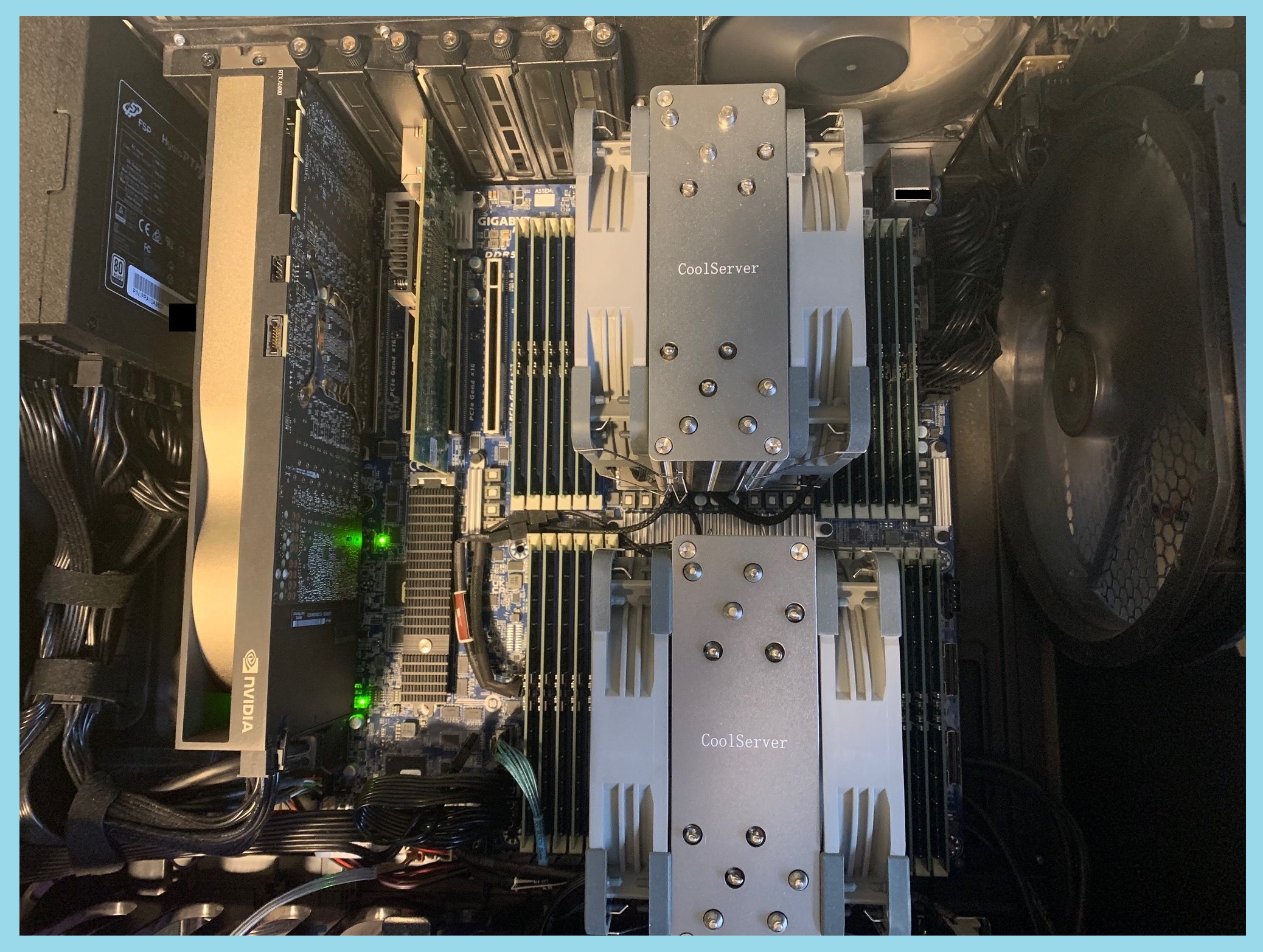
Hardware Build (Rig 1)
Platform
- Motherboard: Gigabyte MZ73-LM1
- CPUs: Dual AMD EPYC 9334 (QS samples)
Note: Newer EPYC “Turin” CPUs support DDR5-6000/6400.
Firmware updates allow compatibility with this board.
Early engineering samples have appeared on eBay at ~$3k per socket.
Memory
- 24 × 32GB Samsung DDR5-4800 RDIMM
- Fully populated for maximum bandwidth
Power Supply
- 1000W quality PSU (example: FSP Hydro PTM X Pro)
Storage
- NVMe via onboard M.2 (NVMe only)
- 4× SATA breakout included
- SlimSAS 8i expansion allows up to 16 additional drives
Case
- Large airflow-focused chassis required
- SP5 sockets and RAM consume significant space
- Ensure large, slow-moving fans for quiet cooling
Cooling
- SP5-compatible coolers (4U server height recommended)
- Example: CoolServer SP5 coolers
- ~Room temp idle
- ~30°C increase under full load
GPU (Optional but Recommended)
- 24GB GPU (example: NVIDIA A5000)
- Onboard video for console
- Use GPU for:
- TTS
- Stable Diffusion
- Context processing
- Acceleration tasks
Linux Configuration
Distribution
- Debian (Trixie), headless
- Kernel 6.6+ strongly recommended
- 6.12 currently performs best in testing
Critical Tuning
- Disable Transparent Hugepages for stability under memory pressure
- Reverse proxy (nginx) with backend services firewalled
- Avoid exposing inference services to the internet
CUDA Compilation Notes
- Modern distros ship gcc13/14
- Some CUDA toolkits require forcing gcc 12/13
- May require editing package dependencies (libtinfo versions)
BIOS Settings
- Use UEFI, not legacy BIOS
- Ensure xGMI link at full speed (4×)
- Disable unused devices to free PCIe lanes
- Configure NUMA:
- NPS0 (single image) recommended for simplicity
- Higher NPS values for multi-user tuning
NUMA Optimization Techniques
EPYC systems require workload-aware tuning.
Multi-Instance Isolation
Using NPS > 0 and numactl:
This isolates execution to NUMA node 3.
Check NUMA topology: numactl -H
Use gnu parallel to test optimal NPS settings.
Memory Locality Optimization
For maximum tokens/sec:
Notes:
- First response may be slow
- Model pages fault into memory progressively
- Full speed typically reached after several responses
- Same principle applies to long-running servers (llama-server, oobabooga, kobold, etc.)
Proper memory locality can double inference speed.
Conclusion
If you want the absolute lowest cost per token/sec, a GPU-focused build may still win.
However, a high-channel-count dual-socket EPYC system offers:
- Massive RAM capacity
- Strong memory bandwidth
- Expandability
- Quiet operation
- General-purpose compute flexibility
- Long-term upgrade paths
For users who need more than just inference performance — virtualization, experimentation, hosting multiple models — this CPU-centric design is a compelling alternative.
If your goal is the simplest cost-effective inference-only system, consider a smaller, more traditional GPU-focused configuration instead.